
How to Fix a Stuck or Pending Crypto Purchase
Troubleshoot pending crypto buys: identify if delay is with your bank, exchange, or on-chain and resolve holds, verifications, or low fees.
If your crypto buy is stuck, I first check where it stopped: bank, exchange order, or blockchain. That one step tells me what to do next and helps me avoid duplicate charges, extra holds, or a second failed order.
Here’s the short version:
- Bank or card issue: I look for a pending charge, decline, 3DS failure, or a crypto block from the card issuer.
- Platform review: I check if the order is waiting on ID, selfie, proof of funds, or a new-device review.
- Blockchain delay: If there’s a TXID, I paste it into a block explorer and check confirmations, time, and fee.
A few numbers matter:
- Card holds can take 3 to 10 business days to drop off.
- Many platform reviews clear in 24 to 48 hours.
- Some manual checks can take 7 to 14 business days.
- If nothing changes after 72 hours, I get my order details together and contact support.
My rule: I don’t retry the purchase until I know the first one failed. If I buy again too soon, I can end up with two charges or another fraud check.
| Where it’s stuck | What I check first | What I do next |
|---|---|---|
| Bank/card | Pending charge, decline, duplicate hold | Call the bank and ask about crypto blocks or failed 3DS |
| Order | Pending, processing, under review | Check email and app for ID or account checks |
| Blockchain | TXID, confirmations, fee, status | Wait, or use wallet fee bump tools if supported |
If I use only the official app or website, keep my seed phrase and private keys to myself, and collect the Order ID, TXID, wallet address, network, amount, screenshots, and timestamp, I can sort out most stuck purchases with less back-and-forth.
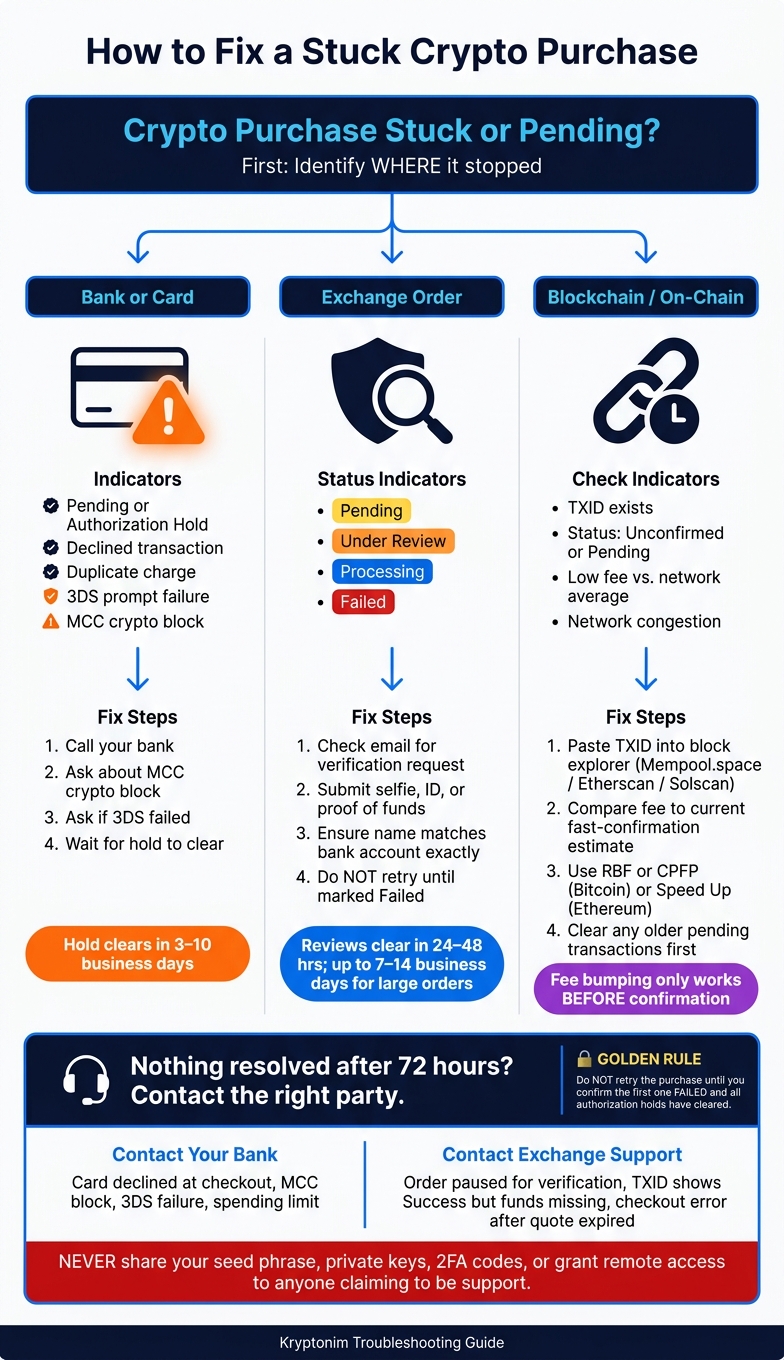
How to Fix a Stuck Crypto Purchase: Step-by-Step Troubleshooting Guide
Step 1: Find where your purchase is stuck
Start by figuring out where the delay is happening: with your bank, inside your Kryptonim order, or on the blockchain.
That matters because each one points to a different fix. A bank issue won't show up the same way as a network delay, and a blockchain delay won't be fixed by retrying the card charge.
Check your bank or card for holds, declines, and duplicate charges
Open your banking app and compare your available balance with your current balance.
If your available balance is lower, your bank has probably placed funds on hold for a pending charge, even if the purchase never finished on Kryptonim's side.
Check for:
- a Pending or Authorization Hold entry
- a declined transaction with no matching order in Kryptonim
- the same charge appearing more than once
If you retried after a decline, that can trigger extra holds. Those holds may take 7 to 10 business days to clear.
A missed 3-D Secure (3DS) prompt or a bank-side Merchant Category Code (MCC) block can also stop the payment before it reaches Kryptonim. If you see a decline but nothing unusual in your order history, your bank or card issuer is the first place to check.
If you don't see a hold or decline at the bank level, move to your Kryptonim order status.
Check your Kryptonim order status
Open Kryptonim and review your order history. Each status tells you something a little different:
| Status | What it means | Your next move |
|---|---|---|
| Pending | Waiting for payment confirmation or internal review | Wait and check whether a TXID has been generated |
| Under Review | Compliance or risk check in progress | Check your email for a verification request |
| Processing | Payment received; crypto transfer is in progress | Wait; this usually resolves quickly |
| Completed | Crypto has been sent | Check your wallet or block explorer |
| Failed | Payment was rejected | Review your bank activity before retrying |
If the status is Under Review, don't retry yet. Wait for the verification request and follow the steps in that message.
If the order already has a TXID, the next stop is the block explorer.
Look up the transaction ID on a block explorer
If Kryptonim shows a transaction ID (TXID), the transaction is already on the network.
Copy that TXID into a block explorer for the right network, such as Etherscan or Blockchain.com, then check the:
- confirmations
- timestamp
- fee
- status
If the explorer shows Unconfirmed or Pending, the transaction is still waiting to be added to a block. That often happens when the fee is too low for current network conditions.
No TXID usually means the delay is still happening at the bank or platform level.
sbb-itb-0796ce6
How to fix payment, verification, and order delays
Now that you know where the delay is happening, the next step is simple: use the fix that fits that stage.
Fix card and bank issues before retrying
If your card was declined or you see an authorization hold, don't jump back in and try again right away. Multiple attempts in a short window can set off extra fraud checks.
Instead, call your bank and ask two direct questions:
- Do you block crypto purchases under the merchant category code?
- Did a 3D Secure (3DS) check fail on your side?
If the answer to either one is yes, ask the bank to approve the merchant before you try the payment again. And if an authorization hold is still showing, wait for it to drop off first. Those holds usually reverse within 3 to 10 business days.
If the bank tells you the payment went through but your order still doesn't show any crypto, the next place to look is the review stage.
Complete identity checks and respond to review requests
If your Kryptonim order says it's under review, that usually means a compliance or risk check is happening behind the scenes. Common triggers include a large order, a new device, a new IP address, or a flagged destination address.
Open your Kryptonim account and look for any request for:
- a selfie
- ID
- proof of funds
Most reviews clear within 24 to 48 hours, but larger orders or mismatched details can stretch that to 7 to 14 business days. One detail matters more than people expect: the name on your bank account should match your Kryptonim profile exactly. If it doesn't, the order often needs manual review.
If the order already has a TXID, then the holdup is not the review process. It's on-chain.
Decide whether to wait, cancel, or rebuy
If the order is still under review, wait for that process to finish. Only place a new order after the first one is marked as failed and the authorization hold has cleared.
This is where people get tripped up. They see a delay, hit buy again, and end up making the mess bigger. Repeating the same failed purchase can trigger duplicate-purchase flags and lead to temporary holds.
If the purchase already has a TXID but still shows as pending, the issue is on the blockchain side.
How to fix a stuck or unconfirmed on-chain transaction
A TXID means your transaction has already been broadcast to the network and is waiting in the mempool, which is basically the queue for unconfirmed transactions. In most cases, confirmation speed comes down to one thing: the fee you paid. If the transaction is still pending, the next step is to check the fee and see whether the network is backed up.
Check for network congestion and low fees
Paste your TXID into the block explorer for the network you used - Mempool.space for Bitcoin, Etherscan for Ethereum and ERC-20 tokens, or Solscan for Solana. Then look at the fee your transaction paid and compare it with current fast-confirmation estimates on a live fee tracker.
If your fee is lower than current average or high-priority estimates, your transaction may be sitting near the back of the queue. That usually happens during heavy congestion, when a low-fee transaction can stay unconfirmed for hours or even days.
The table below shows what each status on a block explorer means and what you should do next:
| Status on Explorer | Meaning | Recommended Action |
|---|---|---|
| Pending / Unconfirmed | Broadcast to network, waiting in mempool | Wait for congestion to clear or use fee-bumping |
| Dropped / Replaced | Removed from the queue or superseded | Check if funds returned to wallet; resend with a higher fee |
| Failed / Reverted | Included in a block but execution failed | Verify contract conditions and retry |
| Confirmed | Successfully added to the blockchain | If funds aren't visible, check for deposit minimums or wrong network |
Use fee bumping or acceleration
If waiting doesn’t work, you’ll need to increase the fee or replace the transaction.
On Bitcoin, RBF lets you resend the same transaction with a higher fee. CPFP works by creating a new transaction with a higher fee so miners confirm both together.
On Ethereum and other EVM-compatible chains, many wallets have a "Speed Up" option. That resends the transaction with the same nonce and a higher gas fee. If your wallet doesn’t show that option, you can manually send a new transaction to your own address using the same nonce as the stuck transaction and a higher gas fee.
One thing trips people up all the time: if an older transaction from the same wallet is still pending, clear that one first. Later transactions from that wallet usually won’t confirm until the older one does.
Fee bumping only works before the transaction is confirmed.
If the transaction still won’t confirm, collect the TXID, fee, and timestamp before you contact support.
When to contact support and what to prepare
Most delays go away once you match the fix to the part that’s causing the problem. If you’ve already checked that and the delay still hasn’t cleared, collect your proof first and then contact the right team.
The big thing here is simple: contact the party that’s actually stuck.
Contact your bank if your card was declined right away at checkout. That often points to an MCC block, a 3D Secure failure, or a spending limit. Your bank can tell you whether crypto-related purchases are being blocked and whether it’s safe to try again. If the bank says the charge went through but the order still shows as pending, the next step is Kryptonim support.
Contact Kryptonim support if your order is paused for verification, if a block explorer shows your transaction as "Success" but the funds still aren’t credited, or if a checkout error happened after the quote expired. If nothing changes for 72 hours, escalate it.
Use the in-app ticket system or the verified website only. Don’t post the issue in public channels. That’s where scammers tend to jump in with phrases like "manual recovery" or "wallet sync." Support only needs proof of the transaction. Never share your seed phrase, private keys, 2FA codes, or remote access.
Details to gather before contacting support
Have these details ready before you open a ticket:
| Detail | Why It Helps |
|---|---|
| Order ID | Finds your purchase record |
| Transaction Hash (TXID) | Shows whether funds left the platform |
| Wallet address | Checks the destination |
| Network/chain | Confirms the right route, such as ERC-20, BTC, or Solana |
| Required memo/tag | Needed for XRP or XLM; a missing tag can lead to a "completed but missing" transfer |
| Exact USD amount | Helps trace fiat funds and spot duplicate charges |
| Bank charge reference | Usually found in your mobile banking app; helpful for holds that last a long time |
| Screenshots of the error screen | Gives proof of error messages or "Pending" screens; make sure no private keys are visible |
| Timestamp | Shows the timeline so support can check logs against it |
If the charge appears on your statement but Kryptonim never received the funds, include the bank authorization reference number too.
FAQs
Why is my crypto purchase still pending?
A crypto purchase can stay pending for two main reasons: the exchange’s own process or the blockchain network itself.
Here’s the simple way to tell what’s going on.
If there’s no TXID and nothing shows up in a block explorer, the delay is usually happening inside the exchange. That can mean bank risk checks, identity verification, security holds, compliance reviews, batching, or waiting for confirmations before the transfer is sent out.
If a TXID does exist, the transaction has already been sent on-chain. At that point, the delay is more likely tied to the network, usually congestion or a transaction fee that’s too low for fast processing.
Should I retry a failed crypto purchase?
Don’t keep hitting Buy after a failed purchase. That can set off extra fraud checks or even lock things down for a while.
Start by finding the reason it failed. Look for messages about insufficient funds, card declines, or extra verification. If the issue is a platform-side compliance or security hold, reach out to official support or submit the ID documents they asked for. If a bank transfer didn’t go through, switch to another payment method, like a digital wallet.
What if my TXID shows confirmed but I received nothing?
If your TXID shows as confirmed on a block explorer but your funds still haven’t shown up, your assets are likely safe and just waiting for the receiving platform to finish its internal processing.
Start by checking the receiving address, network, and any required memo or destination tag. They need to match the recipient’s requirements exactly. If everything looks correct, contact the receiving platform’s support and share your TXID so they can find the transfer and credit the funds.