
Crypto Position Size Calculator: How It Helps
Set dollar risk, entry, stop-loss and fees to size crypto trades and avoid overbuying with a position-size calculator.

I start with how much I can afford to lose - not how much crypto I can buy. A position size calculator turns that loss limit, my entry price, and my stop-loss price into a purchase amount. For example, a hypothetical 1% risk limit on $100 is $1, not a $100 order.
Before buying, I check:
- Trade size: A larger gap between entry and stop means fewer units for the same planned risk.
- Costs and cash: Fees, spread, and slippage leave less room for the purchase, which must fit my budget and the platform’s minimum.
- Checkout details: On Kryptonim, I check regional availability, my wallet address, network, and final payment terms.
- Risk beyond the trade: I review my existing holdings and remember that stops can fill below my planned price. Security failures can also cause a total loss.
My rule: treat the result as <u>a maximum, not a target</u>. Buying less - or skipping the trade - is fine. Planned risk is never a guaranteed loss limit.
Gather your calculator inputs
For a spot trade without leverage, you need five inputs: trading capital, risk limit, entry price, stop-loss price, and trading costs. These help you avoid buying too much. Start by deciding how much you can risk on a single trade.
Set your trading budget and risk limit
Use only money set aside for trading. Leave out funds for rent, bills, debt payments, emergency savings, and business operating costs.
Dollar risk limit = trading capital × risk percentage.
A hypothetical 1% limit gives you $1.00 of risk on a $100.00 budget, or $5.00 on a $500.00 budget.
The 1% limit is an example, not a recommendation.
Choose your entry and stop-loss prices
Your entry price is the price you plan to pay. Your stop-loss price is your planned exit price if the market moves against you. For a long spot purchase, place the stop below your entry price.
Base the stop on the trade, not the position size. Then account for fees and slippage.
Estimate your round-trip costs, including fees, spread, and slippage. Enter those costs in the calculator or leave part of your risk limit unused.
The calculator uses these inputs to show position sizes for different budgets and stop distances, helping you avoid buying too much.
sbb-itb-0796ce6
Calculate position size for $100 and $500 budgets
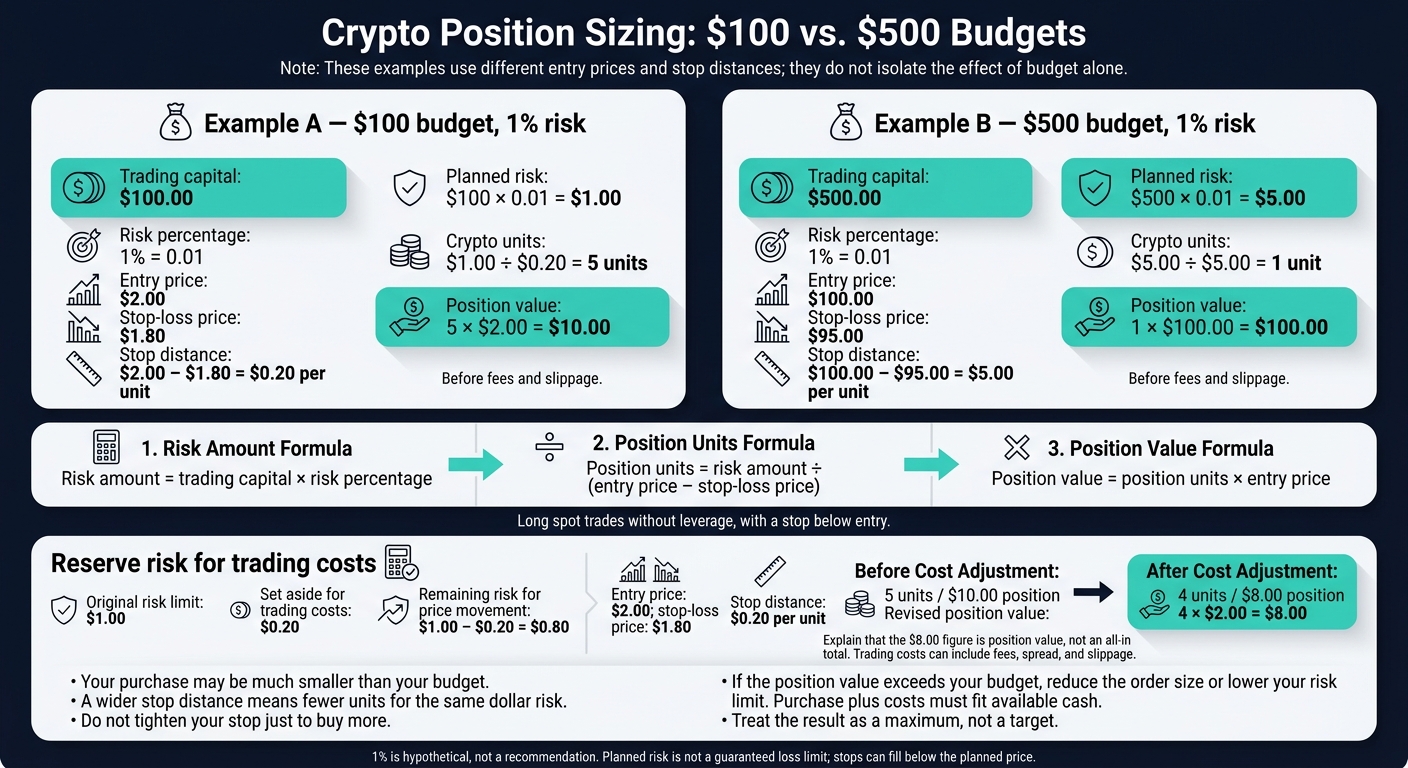
Crypto Position Sizing: $100 vs. $500 Budgets
Use the inputs above to work out how much you can buy without overbuying. For long spot trades with a stop below entry, apply these formulas before fees and slippage. Write 1% as 0.01:
Risk amount = trading capital × risk percentage
Position units = risk amount ÷ (entry price − stop-loss price)
Position value = position units × entry price
Compare 2 position size examples
These examples show how small budgets turn into small, controlled orders.
Scenario Entry price Stop-loss price Planned risk Crypto units Position value $100 budget, 1% risk $2.00 $1.80 $1.00 5 $10.00 $500 budget, 1% risk $100.00 $95.00 $5.00 1 $100.00 For the $100 budget: $100 × 0.01 = $1.00 of planned risk. Then $1.00 ÷ ($2.00 − $1.80) = 5 units. At entry, 5 × $2.00 = a $10.00 position.
Your purchase may be much smaller than your budget. Don't spend the rest just because it's available. If the calculated position value exceeds your budget, reduce the order size or lower your risk limit until the purchase fits a spot trade.
See how stop distance changes position size
A larger gap between entry and stop means fewer units for the same dollar risk. A tighter stop lets you buy more units, but normal price swings may trigger an exit. Do not tighten your stop just to buy more. Use the calculator to set your maximum buy size before placing the order.
Allow for trading costs
Once you've sized the trade, set aside part of your risk limit for trading costs. That leaves less room for price risk, so recalculate the number of units you can buy.
Setting aside $0.20 from a $1.00 risk limit leaves $0.80 for price movement. With a $2.00 entry and $1.80 stop, $0.80 of price risk ÷ $0.20 stop distance = 4 units, giving an $8.00 position.
Use the calculator before buying
Fix your trade plan before using the calculator. Set your trade budget, dollar risk cap, exit plan, and calculator inputs before you buy.
Include fees so the total stays within budget. Check that the purchase plus costs fits your available cash and meets the platform’s minimum order. Kryptonim’s minimum transaction is €10 or the equivalent in other currencies.
Treat the calculator result as a maximum, not a target. Recalculate if the entry price changes, then record the final size and costs in your trade log. If the number is lower than you expected, size down rather than forcing the trade.
Buy no more than the calculated amount
When placing your order, enter no more than the calculated amount. Buying less or skipping the trade is fine. If the total cost exceeds your budget, reduce the order or wait until it fits.
Use your planned purchase amount on Kryptonim
Enter your pre-sized purchase amount on Kryptonim. Check that Kryptonim is available in your region before paying.
Kryptonim sends crypto directly to your own wallet. Before paying, double-check the wallet address, network, total charge, and expected crypto amount. The final price is set when payment is received, and payments are final once processed.
Conclusion: check planned risk before every trade
Once you’ve calculated your position size, use it as a final check before every trade. Set your loss limit first, then size the trade to fit. Position sizing helps prevent overbuying and emotional trades. It doesn’t assess asset quality or concentration risk.
Know the calculator's limits
Planned risk is a target, not a guarantee. Stops can slip in fast markets, so a position’s loss can exceed your per-trade risk limit. Security failures can also cause a total loss.
Review your pre-purchase checklist
Before paying, check your dollar risk cap, entry price, and stop distance.
Confirm delivery to your self-custody wallet. Review your existing holdings to make sure no single position dominates your portfolio. Then place no more than the calculated amount.
FAQs
How do I choose my risk percentage?
Weigh your comfort with market swings against how much you can afford to lose. Many beginners find that putting 1% to 5% of their total investment portfolio into cryptocurrency fits their comfort level and budget.
Think about how you’d react to a 50% market drop. If it would cause stress or lead you to sell on impulse, choose a smaller allocation. Invest only money you can afford to lose without touching funds for basic expenses or emergencies.
What if my calculated order is below the minimum?
If your calculated order size falls below the platform’s minimum, don’t force the trade. Consider dollar-cost averaging to build your investment over time until you reach the required threshold.
Kryptonim’s low minimum transaction requirements make it easier to invest on a smaller budget. Keep your planned investment in line with your risk tolerance and financial goals. Don’t place impulsive trades or invest more than you planned just to meet the minimum.
How should I limit risk across multiple trades?
Spread your investments across market caps and asset categories, keeping each position at 5–10% of your total portfolio. Use dollar-cost averaging - investing a fixed amount at regular intervals - to reduce volatility’s impact and take some pressure off timing the market.
Set clear rules for managing risk. Use stop-loss orders to help limit potential losses, though they don’t guarantee an execution price. Rebalance quarterly or when an asset’s allocation crosses a preset threshold to keep your portfolio aligned with your target risk levels.