
2FA Apps vs SMS For Crypto Trading
Use authenticator apps over SMS for crypto—safer against SIM-swap and interception; save backup codes.
Use an authenticator app, not SMS, for your crypto account. If someone takes over your phone number, SMS codes can go to them. In 2024, the FBI’s IC3 logged 982 SIM-swap complaints and about $26 million in losses.
Here’s the short answer:
- Authenticator apps are the better default for most traders
- SMS is easier to start, but it depends on your phone carrier
- App codes work offline and don’t rely on your phone number
- SMS is more exposed to SIM swaps, text interception, and delivery delays
- Both can fail in phishing attacks if you enter your code on a fake login page
- Backup codes matter if you lose or reset your phone
If I were setting up a crypto exchange account today, I’d turn on app-based 2FA before depositing funds and save my backup codes right away.
Quick Comparison
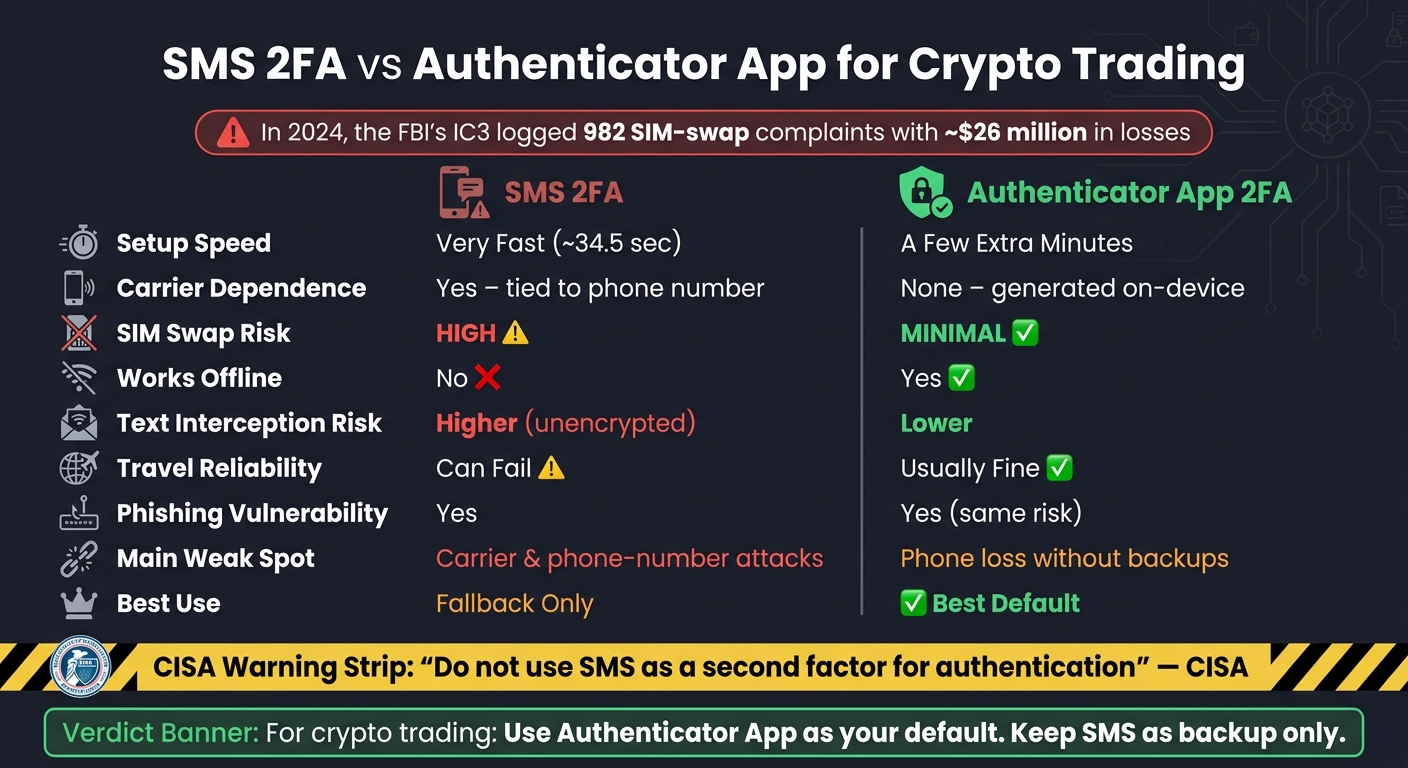
SMS 2FA vs Authenticator App: Crypto Security Comparison
| Factor | SMS 2FA | Authenticator App 2FA |
|---|---|---|
| Setup | Fast | Takes a few more minutes |
| Depends on phone number | Yes | No |
| Depends on carrier | Yes | No |
| Works offline | No | Yes |
| SIM-swap risk | High | Low |
| Text interception risk | Higher | Lower |
| Travel reliability | Can fail | Usually fine |
| Main weak spot | Carrier and phone-number attacks | Phone loss without backups |
| Best pick | Backup only | Best default |
Bottom line: for crypto trading, app-based 2FA is the safer choice, while SMS is better kept as a fallback.
sbb-itb-0796ce6
How SMS codes and 2FA apps work
SMS sends the code through your carrier. Authenticator apps generate it on your device. That one difference affects both convenience and reliability.
SMS codes rely on your phone number and carrier
You enter your password, the exchange sends a one-time code by text to your phone number, and you enter it before it expires. Simple enough.
The catch is that delivery depends on your carrier. If your signal is weak, the network is busy, you're traveling, or you've changed numbers, the code can show up late or not at all.
For those looking to buy crypto, that's a problem. SMS can fail at the exact moment account access matters most.
SMS is easier to set up. App-based 2FA depends less on your carrier.
Authenticator apps generate codes on the device
Authenticator apps like Google Authenticator, Authy, and Microsoft Authenticator use TOTP. You scan a QR code once, then the app creates a new 6-digit code every 30 seconds on your device, with no text message and no carrier involved.
It also works offline, including in airplane mode or while abroad, as long as your device clock is correct.
That delivery gap is a big reason SMS faces more risk from interception and SIM swap attacks.
Security differences: SIM swap risk and interception
Why SMS is more exposed to SIM swap attacks
SIM swap fraud is simple, and the damage can hit fast. An attacker talks your carrier into moving your phone number to a SIM card they control. After that, every SMS code sent to you lands in their hands instead. They don't need your phone. They just need your number.
That's a big reason SMS is a weak second factor for crypto accounts. Text messages can also be intercepted while in transit because SMS isn't encrypted. Older telecom systems like SS7 can be abused by skilled attackers to read messages before they reach you. And if malware gets onto a phone, it can grab incoming codes too.
CISA guidance explicitly states:
"Do not use SMS as a second factor for authentication", noting that SMS messages are not encrypted and that anyone with access to a telecom provider's network could intercept and read them.
So the risk isn't just SIM swaps. SMS codes can also be intercepted before you ever see them.
Where authenticator apps are stronger and where they fall short
Authenticator apps avoid the carrier issue altogether. Codes are generated on your device using the app's stored secret, so a SIM swap doesn't expose those app-based codes.
That said, app-based 2FA still has a weak spot: real-time phishing. If you type your password and code into a fake exchange login page, an attacker can steal that code and use it before it expires. In that situation, both methods have the same problem.
The other pain point is device loss. If you lose or reset your phone without saved backup codes, you can lock yourself out of your exchange account. That's why it's smart to store backup codes somewhere secure before you need them.
App-based 2FA is the stronger pick against SIM swaps and interception, but setup time and day-to-day use still shape the choice.
Setup time, offline use, and day-to-day convenience
SMS is faster to start but less reliable when traveling
Once security is out of the way, the day-to-day issue is pretty simple: speed vs. reliability.
SMS 2FA takes about 34.5 seconds on average to turn on. For beginners, it’s the fastest pick. That makes signup feel easy, which matters when you just want to get into your account and move on.
But that speed has a catch. It doesn’t fix delivery delays. In a fast-moving market, a late code can stop a trade cold. SMS also gets shaky when you’re traveling, since codes can arrive late or not show up at all. And by the time the message lands, the code may already be expired.
2FA apps take a few extra minutes to set up but work offline
Authenticator apps take a few more minutes to connect, but they keep working offline once setup is done. The codes are generated on your device, so you don’t need cell service or Wi-Fi.
The main downside is simple: if you lose your phone and don’t have backups, you can lock yourself out. That’s why it helps to save your backup codes right away in a password manager or another secure place when you first set up 2FA.
That gap in reliability is a big reason many exchanges default to app-based 2FA.
Why exchanges favor app-based 2FA and which option to choose
Because of those risks, exchanges tend to prefer app-based 2FA. The main reason is simple: it keeps your codes off the carrier network. SMS codes can be intercepted or redirected during a SIM swap. Authenticator apps, on the other hand, generate codes right on your device. That means there’s no phone number to take over and no carrier network in the middle.
Best default choice for most traders and beginners
Turn on 2FA before you deposit any funds. If your exchange offers an authenticator app, pick that instead of SMS from day one. And save your backup codes before you ever need them.
Here’s the short version:
| Factor | SMS 2FA | Authenticator App 2FA |
|---|---|---|
| Setup speed | Very fast | A few extra minutes |
| Carrier dependence | Yes - tied to your phone number | None - codes generated on-device |
| SIM swap risk | High | Minimal |
| Works offline | No | Yes |
| Best use | Fallback only | Strongest default for most traders |
For most traders, app-based 2FA is the better default. SMS works best as a backup option.
FAQs
Can a SIM swap bypass my crypto account security?
Yes. If your crypto account uses SMS-based 2FA, a SIM-swap attack can give an attacker your SMS verification codes. They do that by getting your phone number transferred to a different SIM card under their control.
Kryptonim’s guidance is simple: skip SMS 2FA when you can. Use a TOTP authenticator app or a hardware security key instead. Those codes are created on your device, so they don’t rely on your phone number.
What happens if I lose my phone with app-based 2FA enabled?
If you lose the device with your 2FA app, start with your backup recovery codes. You should have received them when you first set up 2FA, and they’re usually the fastest way back into your account.
No backup codes? Check whether the account offers other recovery methods, like email or SMS verification. If those options aren’t available either, your next step is to contact support. They can reset 2FA after confirming that you own the account.
Do authenticator apps work when I’m traveling or offline?
Yes. A TOTP authenticator app creates new 6-digit codes right on your device, so it keeps working offline while you travel. The code updates every 30 seconds and doesn’t need cell service, unlike SMS.
It also gives you more protection against SIM-swap attacks because the codes aren’t linked to your phone number. Just set it up ahead of time and keep your recovery or backup codes in a safe place.