
Web Wallet Security: Best Practices
Practical steps to secure your web wallet: strong passwords, 2FA/hardware keys, offline seed storage, phishing defense, safe transactions, and updated software.
Your web wallet is the key to your crypto assets, but it’s also a target for cybercriminals. In 2025 alone, $3.1 billion was lost to crypto-related crimes, with tactics like phishing, malware, and social engineering becoming more advanced. This guide covers practical steps to secure your wallet, including:
- Strong Passwords: Use long, random passphrases and store them in a secure password manager.
- Two-Factor Authentication (2FA): Opt for authenticator apps or hardware security keys over SMS codes.
- Seed Phrase Safety: Store your seed phrase offline in secure, physical locations - never digitally.
- Phishing Awareness: Verify URLs, avoid clicking suspicious links, and never share private keys or seed phrases.
- Secure Transactions: Double-check addresses, use test transactions, and whitelist trusted addresses.
- Software and Network Security: Keep wallet software updated, avoid public Wi-Fi, and use antivirus software.
Password Management and Access Control
Your password serves as the first line of defense for your web wallet. It protects the interface - whether it’s a software application or browser extension - that you rely on to access your funds. Without a strong password in place, anyone with physical or remote access to your device could potentially open your wallet and steal your assets, making secure transactions and robust access control essential.
Managing passwords effectively is critical in defending web wallets against cyber threats that continue to evolve. Yet, creating secure and memorable passwords remains a challenge for many users. As Security in a Box aptly explains:
No human brain is powerful enough to develop and remember passwords that are sufficiently long, random and unique to keep all of their devices and accounts secure.
To overcome this, it’s important to adopt tools and habits that protect your credentials. Start with crafting a strong password and then focus on managing how and where you store and update it.
Creating Strong Passwords
Length trumps complexity. Studies reveal that longer passwords are far more resistant to brute-force attacks than shorter ones filled with symbols. Aim for a passphrase that’s at least 16 characters long - ideally six or more random words strung together.
Steer clear of predictable patterns. Avoid using personal information or common choices like "Password1!" - these are among the first things attackers will try.
A smarter choice is a passphrase: a sequence of six or more random words selected using dice and a word list. This method creates a password that’s both highly secure and easier to remember than a chaotic mix of characters. While adding uppercase letters, numbers, or symbols can enhance complexity, prioritize length and randomness above all else.
Secure Password Storage
Never store your passwords in places like browser autofill, email drafts, or cloud-based notes (e.g., iCloud or Google Drive), as these are vulnerable to attacks.
Instead, use a dedicated password manager. Offline options like KeePassXC (compatible with Windows, macOS, and Linux), KeePassDX (for Android), or Strongbox (for iOS) encrypt your passwords in a local database, keeping them off remote servers. With a password manager, a single, strong master passphrase secures all your credentials.
If you prefer syncing passwords across multiple devices, online password managers can provide that convenience. However, keep in mind that your encrypted data will be stored on third-party servers. Whichever method you choose, make sure to regularly back up your password database to prevent losing access if your device malfunctions.
Once your passwords are securely stored, shift your focus to updating them only when necessary.
Regularly Updating Passwords
Routine password updates are no longer recommended. Modern guidelines from NIST suggest avoiding frequent password changes, as they often lead to weaker replacements or encourage insecure behaviors like writing passwords down.
Instead, update a password only after a security breach or compromise. Use breach monitoring tools to receive alerts if your credentials are exposed. And, if you’ve ever shared a password via email or text, replace it immediately.
sbb-itb-0796ce6
Enabling Two-Factor Authentication (2FA)
A strong password is your first line of defense, but two-factor authentication (2FA) takes your wallet's security to the next level by adding another verification step. Even if someone manages to steal your password - through phishing or a data breach - they still can't access your wallet without this second factor. This is typically a time-sensitive code from an authenticator app or a physical security key.
According to Microsoft, multi-factor authentication can block 99.9% of account breaches. This extra layer works by combining something you know (your password) with something you have (like your phone or a security key). It ensures that a password alone isn’t enough to grant access. Here’s how to set up and optimize your 2FA for the best protection.
Not all 2FA methods are equally secure. SMS-based codes are the weakest option because they’re vulnerable to SIM swapping attacks, where someone hijacks your phone number. Instead, use an authenticator app, which generates codes that are tied to your device and independent of your carrier. For even stronger protection, a hardware security key is your best bet. These keys are considered phishing-proof because they confirm the legitimacy of the website before providing access. Combined with a strong password, these tools significantly enhance your wallet’s security.
To enable 2FA, go to your wallet's security settings and choose an authenticator app (skip SMS-based options). Scan the QR code provided, verify the code generated by the app, and securely store your recovery codes offline - either in a safe or an encrypted password manager. Losing these recovery codes could lock you out of your account permanently. For added safety, set your wallet to require 2FA for every outgoing transaction, not just for logging in. This step ensures that even if someone accesses your unlocked device, they can’t make unauthorized transfers. For high-value accounts, consider using a hardware security key that requires manual confirmation for every transaction.
Recognizing and Avoiding Phishing Scams
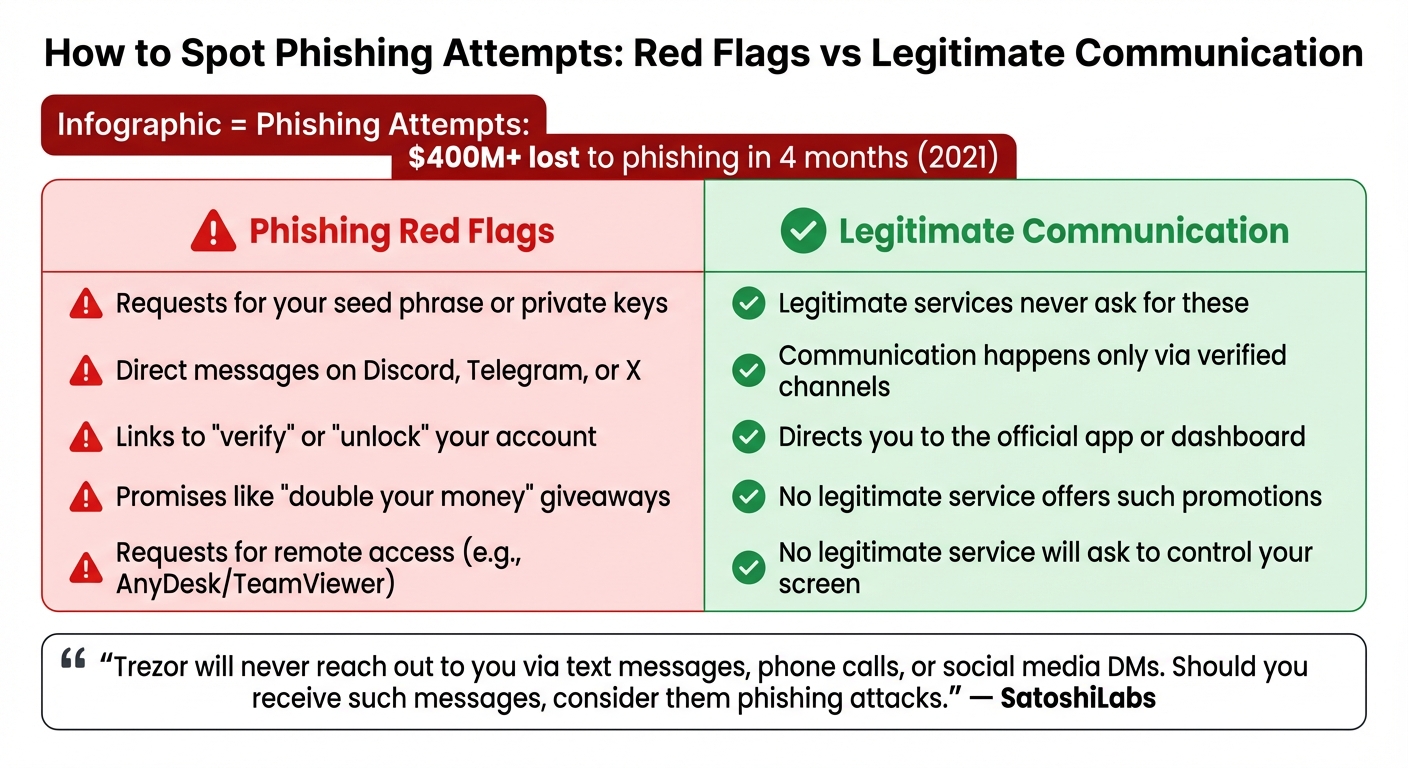
Phishing Red Flags vs Legitimate Crypto Communication
Phishing has become a major driver of crypto theft, leading to over $400 million in losses during just the first four months of 2021. Unlike traditional hacking, phishing relies on deception to make you willingly hand over sensitive information. Just one mistake - like entering your seed phrase on a fake site or clicking a harmful link - can empty your wallet in moments.
Identifying Phishing Attempts
Phishers often rely on urgency and fear to manipulate their targets. Be cautious of messages that pressure you to act immediately, such as warnings about account suspensions or unauthorized logins. Requests for your 12- or 24-word seed phrase, private keys, or two-factor authentication codes are always fraudulent.
Another common tactic is the use of lookalike URLs. Scammers might replace characters in a domain name to trick you - like using "ph4ntom.app" instead of the legitimate "phantom.app." Real-world examples include the March 2023 MyAlgoWallet phishing campaign, where scammers stole around $10 million, and the June 2023 Atomic Wallet incident, which resulted in nearly $35 million in losses over a weekend.
To protect your wallet, always verify the authenticity of the websites you visit.
Verifying Website Authenticity
Manually typing your wallet's URL into your browser is one of the safest ways to ensure you're on the correct site. Bookmarking the official website is another reliable method. Additionally, password managers can help - if they don’t auto-fill your credentials on a site that looks familiar, it could be a red flag. Before clicking any link, hover over it to check the destination, and expand shortened URLs to confirm they’re legitimate.
"Trezor will never reach out to you via text messages, phone calls, or social media DMs. Should you receive such messages, consider them phishing attacks."
Here’s a quick comparison to help you spot phishing attempts:
| Phishing Red Flag | Legitimate Communication |
|---|---|
| Requests for your seed phrase or private keys | Legitimate services never ask for these |
| Direct messages on Discord, Telegram, or X | Communication happens only via verified channels |
| Links to "verify" or "unlock" your account | Directs you to the official app or dashboard |
| Promises like "double your money" giveaways | No legitimate service offers such promotions |
| Requests for remote access (e.g., AnyDesk/TeamViewer) | No legitimate service will ask to control your screen |
By staying vigilant and verifying websites, you can significantly reduce your risk of falling victim to phishing scams.
Best Practices for Email and Communication
To reduce risks, disable automatic external image downloads in your email settings. This prevents scammers from tracking when you open their messages. If you receive a suspicious email claiming to be from your wallet provider, avoid clicking any embedded links. Instead, confirm its legitimacy by contacting support through the provider’s official website. Be especially cautious of unsolicited messages on platforms like Telegram, Discord, or X - legitimate support teams will never initiate contact with you directly.
Seed Phrase and Private Key Security
Protecting your seed phrase and private keys is just as important as safeguarding passwords and defending against phishing attempts. These keys are your sole access to your cryptocurrency - the ultimate "master password" to your wallet. But unlike other accounts, there's no "forgot password" option here. If someone gets hold of your seed phrase, they can take control of your funds. Lose it, and your assets are gone for good.
Consider the risks: In January 2023, Proof founder Kevin Rose lost over $1 million in NFTs due to a wallet compromise. Similarly, MyAlgoWallet users faced losses of around $10 million in March, and Atomic Wallet saw nearly $35 million stolen in just one weekend in June. Securing your keys is a vital layer of protection, alongside strong passwords and two-factor authentication.
"Not your keys, not your coins." - Kraken
Offline Storage of Seed Phrases
Never store your seed phrase digitally. Avoid saving it in screenshots, cloud services like iCloud or Google Drive, email drafts, or even password managers. These methods are vulnerable to malware and breaches. A stark example is the LastPass breach, where attackers accessed customer vault backups. Users who had stored seed phrases in "secure notes" found their wallets drained.
For short-term storage, write your seed phrase on acid-free paper. For long-term safety, invest in metal plates made of stainless steel or titanium. These can withstand extreme conditions, such as fire (up to 2,552°F) and water damage. To avoid a single point of failure, keep multiple copies in separate physical locations, like a home safe and a bank deposit box. And when writing down your phrase, ensure there are no cameras, smartphones, or smart assistants nearby.
Once your seed phrase is securely stored offline, the next step is managing access to your private keys.
Never Sharing Private Keys
Your private key is the gateway to your funds - anyone with access effectively owns your assets. Blockchain transactions are irreversible, and there's no central authority to undo a theft or retrieve stolen crypto.
"Legit support will NEVER ask for your seed phrase. Never." - Coin Bureau
Reputable wallet providers, such as MetaMask and Coinbase, will never ask for your seed phrase or private keys. The dangers of improper storage are clear: In the Slope Wallet hack, users' seed phrases were stored in plain text on centralized logs, leading to over $4 million in stolen funds. Even trusted friends or family shouldn't have access to your keys. If you're planning for inheritance, create a separate document that specifies where backups are stored - without including the actual seed phrase.
Keeping your private keys private is essential, but you also need to ensure you can recover access to your wallet when needed.
Testing Recovery Processes
Before storing significant funds, test your recovery process. Use your seed phrase to regenerate your wallet on a separate, secure device. Some hardware wallets, like Trezor, allow you to verify your recovery seed directly on the device, keeping it offline and secure. Make it a habit to perform an annual recovery test with a small test wallet to confirm your backups are still legible and you understand the recovery process. Additionally, inspect your physical backups quarterly for signs of fading, damage, or wear.
Remember, a 12-word seed phrase provides 128 bits of entropy, while a 24-word phrase offers 256 bits. Both are highly secure - but only if they remain intact and accessible when needed.
James Howells serves as a cautionary tale. He accidentally discarded a hard drive containing the private keys to over 7,500 BTC. With no backup, those funds are forever lost. His story underscores the importance of avoiding a single point of failure.
Safe Transaction Practices
Once you've secured your seed phrase and protected your private keys, the next step is ensuring that every transaction you make is as safe as possible. Blockchain transactions are irreversible. A simple mistake - like a typo, choosing the wrong network, or pasting a malicious address - can lead to permanent loss of funds. By adopting certain habits, you can avoid costly errors. Here's how to make your transaction process as secure as your wallet credentials.
Verifying Recipient Addresses
Even with secured access, it's essential to verify recipient details thoroughly. Check every single character of the wallet address - not just the first or last few digits. Scammers often exploit shortcuts like this by creating addresses that look almost identical to legitimate ones, a tactic called "address poisoning". This can trick you into copying and sending funds to a scammer's wallet instead of the intended recipient.
Be cautious of clipboard malware, which can replace a valid address with a fraudulent one as soon as you paste it. To counter this, consider using a hardware wallet that allows you to verify transaction details on an offline screen. Always obtain the recipient's address through a secure channel, such as an encrypted message or a phone call.
Also, double-check that the blockchain network matches on both ends. For instance, sending Ethereum to a Solana address will result in the permanent loss of those funds.
"Your signature serves as the final confirmation of that transaction. Reviewing carefully before signing is therefore the last line of defense for your assets." - KuCoin
Using Test Transactions for Large Transfers
For larger transfers, it's wise to send a small test transaction first. This simple step has saved many users from losing funds due to network mismatches or address errors. Start by transferring a minimal amount - just enough to confirm receipt on the correct blockchain. Once the test transaction is successfully confirmed using a block explorer, you can proceed with the full transfer.
While this process adds a small gas fee, it's a small price to pay compared to the risk of losing your entire balance. For context, Bitcoin transactions can take anywhere from 10 minutes to an hour to confirm, while Ethereum transactions average about 12 seconds. Some modern Layer 2 solutions even offer near-instant confirmations.
"Sending a small test transaction before you send your full amount can help make sure all the details are correct and you do not make a mistake you are unable to reverse." - Kraken Learn team
Whitelisting Trusted Addresses
Many wallets and exchanges include a feature called "Address Book" or whitelisting, which allows you to save and label frequently used addresses. This eliminates the need to repeatedly copy addresses from transaction histories or external notes - both of which are vulnerable to clipboard malware and address poisoning. When adding an address to your whitelist, verify it through a trusted channel, such as the recipient's official website or a direct phone call, to ensure its accuracy.
It's also a good idea to periodically review your whitelisted addresses and remove any that are no longer needed. For frequent transactions, you might want to use Web3 domains (like .eth or .sol), which map complex wallet addresses to simple, human-readable names. This reduces the chance of copy-paste errors.
| Feature | Whitelisting (Address Book) | Copy-Paste from History |
|---|---|---|
| Security Level | High; protects against clipboard malware and poisoning | Low; highly vulnerable to address poisoning |
| Ease of Use | High; one-click selection with recognizable labels | Moderate; requires manual searching and copying |
| Risk of Error | Low; address is verified once and stored securely | High; risk of copying a "poisoned" lookalike address |
"Never copy directly from transaction history to avoid falling victim to 'poisoned address' scams." - KuCoin
Software and Network Safety
Protecting your digital environment goes beyond keeping credentials secure - it also involves using updated software and practicing safe network habits. Recent incidents highlight how crucial this is, as many losses stem from malware infections, outdated software, and unsecured networks. Once your credentials and transaction details are secure, focus on fortifying your devices and networks to keep external threats at bay.
Keeping Wallet Software Updated
Keeping your wallet software updated is one of the simplest yet most effective ways to stay ahead of potential threats. Developers frequently release patches to address vulnerabilities that hackers actively exploit. Whether it’s a browser extension, mobile app, or your operating system, delaying updates can leave you exposed. For instance, in March 2025, malware injected via a file converter hijacked transactions by replacing recipient addresses.
When downloading wallet software or extensions, always stick to official sources. A 2025 investigation uncovered over 40 fake browser add-ons on Mozilla Firefox’s extension site. These mimicked popular wallets like MetaMask, Phantom, and Coinbase, using fake 5-star reviews to trick users and steal private keys. Be cautious with search engine ads, too - these often link to fake websites.
Using legitimate, non-pirated versions of your operating system is just as critical. Pirated software doesn’t receive security updates, leaving your device exposed to known vulnerabilities. To stay protected, enable automatic updates for your wallet, browser, operating system, and device firmware. If malware is suspected, a full reinstallation of your operating system is the most reliable solution. These software practices work hand-in-hand with secure transaction habits.
Avoiding Public Wi-Fi for Transactions
Updated software is essential, but your choice of network matters just as much. Public Wi-Fi networks - like those in airports, coffee shops, or hotels - are notorious for being hotspots for man-in-the-middle attacks. In these attacks, hackers intercept the data exchanged between your device and your wallet. Rogue access points, disguised as legitimate networks, can trick your device into connecting, exposing sensitive information like passwords or even altering data to redirect crypto transfers.
To minimize risk, avoid conducting transactions over public Wi-Fi. Instead, use your mobile data or a secure VPN.
Malware and Antivirus Protection
Today’s malware is designed to stay hidden until it’s too late - often only discovered after a wallet has been drained. Some malware scans local files for private keys or seed phrases, while others monitor your clipboard to replace copied wallet addresses with those of attackers.
"Knowing best security practices of Web3 wallets is no longer optional, since we're starting to observe blackhats upgrading malware to drain Web3 browser wallets like MetaMask after infecting computers." - Immunefi
To counter these threats, install reputable antivirus software on all devices used for crypto transactions. Set your wallet to auto-lock after short periods of inactivity. For even greater security, consider using a Virtual Machine (VM) dedicated solely to hot wallet activities. This isolates your wallet from any malware that might be present on your primary operating system.
Another important step is to regularly review and revoke permissions for decentralized applications you no longer use. Tools like Revoke.cash can help disconnect your wallet from smart contracts, reducing your exposure to potential risks.
Using Secure Platforms for Crypto Transactions
When it comes to safeguarding your cryptocurrency, picking a secure transaction platform is just as important as personal security measures.
Choosing Regulated and Transparent Platforms
Even if you’ve nailed the basics - strong passwords, two-factor authentication, and keeping your software updated - your efforts can be undermined by using an unregulated or shady platform. History has shown that breaches on such platforms can lead to massive financial losses, sometimes amounting to millions of dollars.
To minimize risks, look for platforms that comply with regulations. Regulated platforms follow strict AML (Anti-Money Laundering) and KYC (Know Your Customer) standards, which provide an added layer of legal protection. Additionally, platforms with transparent fee structures are crucial, as unclear or hidden fees can signal potential security or trust issues. Features like app-based two-factor authentication (2FA) and withdrawal address whitelisting are also key indicators of a platform’s commitment to security.
By focusing on these factors, you can find platforms that strike a balance between ease of use and robust security.
Introduction to Kryptonim
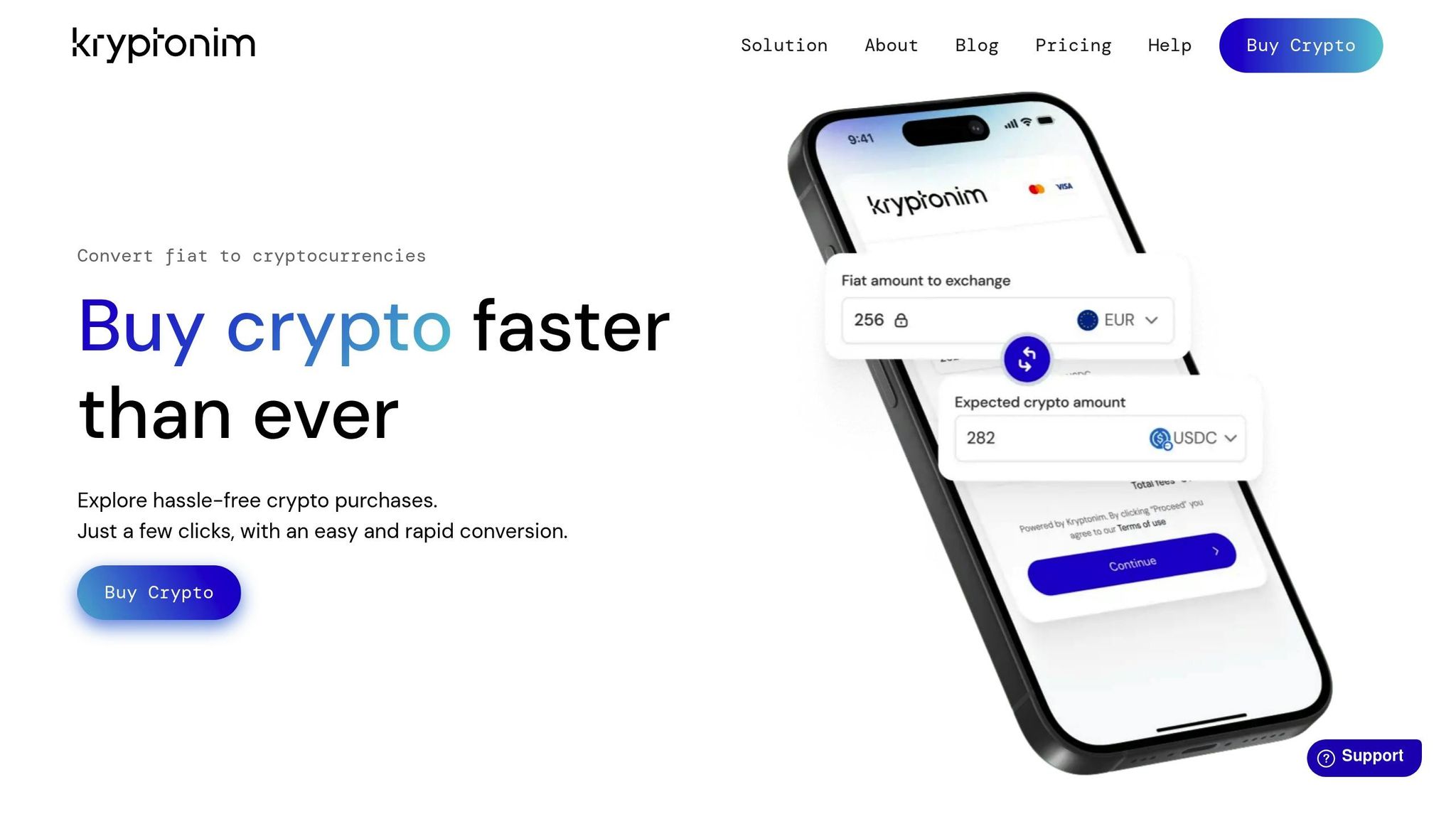
A standout example of such a platform is Kryptonim. This service specializes in secure fiat-to-crypto transactions while adhering to EU regulatory standards. What sets Kryptonim apart is its no-account-creation model, which reduces data exposure. Without a centralized database of user credentials, the risk of data breaches is significantly reduced.
Kryptonim charges competitive transaction fees - 2% for EU users and 4% for others. Its straightforward interface makes it easy to complete transactions quickly, which is especially helpful if you need to transfer funds into secure storage, like a hardware wallet, without delay. For both beginners taking their first steps into crypto and seasoned users prioritizing speed and safety, Kryptonim offers a practical and reliable solution. With transparent pricing and regulatory backing, it’s designed to make crypto transactions both secure and hassle-free.
Conclusion and Final Checklist
Keeping your web wallet secure demands consistent attention. With $3.1 billion lost to cryptocurrency-related crimes in the first half of 2025 alone, many of these losses could have been avoided with better security habits.
Your wallet's safety rests on three main pillars: strong access controls, secure offline backups, and careful transaction practices. As Coinbase explains, "The recovery phrase is the master password to your wallet - as long as you have your recovery phrase, you'll have access to all of the crypto and NFTs associated with the wallet". To protect this critical information, store your recovery phrase in two separate, offline locations - like on paper or etched metal - and never save it digitally.
Here’s a quick checklist to help you stay on top of wallet security:
- Regular Maintenance: Set a monthly reminder to update your wallet software, review and revoke unused dApp permissions, and check that your seed phrase remains safe and legible.
- Segmentation of Funds: Divide your assets across multiple wallets to limit potential losses. For amounts over $1,000, consider using a hardware wallet to keep your private keys offline. Use different wallets for specific purposes, such as a cold storage wallet for savings, a hot wallet for daily use, and a burner wallet for testing new platforms.
- Transaction Caution: Always double-check recipient addresses before sending funds. Start with a small test transaction to verify accuracy.
- General Safety Practices: Enable auto-lock timers on wallet apps, avoid public Wi-Fi for transactions, and never share private keys - not even with customer support.
FAQs
What should I do first if I think my wallet was hacked?
If you think your wallet has been hacked, the first step is to disconnect your device from the internet right away. This helps prevent any further unauthorized access. Next, update all related passwords immediately to protect your accounts. Make sure to use strong, unique passwords to enhance security.
How do I safely back up and store my seed phrase at home?
To keep your seed phrase safe, write it down on durable paper using waterproof ink, or go a step further by engraving it on metal for extra durability. This ensures it can withstand damage from water, fire, or wear over time.
Store multiple copies in secure, offline locations, such as a fireproof safe or a safety deposit box. Keeping it offline minimizes the risk of cyberattacks. Avoid saving your seed phrase digitally - this includes taking photos, screenshots, or storing it in cloud services - as these methods leave you vulnerable to hacking.
It's also a good idea to test your backups periodically by restoring your wallet to ensure the seed phrase is accurate and functional. For those managing larger crypto holdings, you might want to explore multisignature wallets, which add another layer of security by requiring multiple approvals for transactions.
When should I use a hardware wallet instead of a web wallet?
When it comes to securely storing large amounts of cryptocurrency, a hardware wallet is the way to go. Unlike web wallets, which are connected to the internet and more vulnerable to hacking, phishing, and malware, hardware wallets keep your assets offline. This added layer of security makes them an excellent choice for protecting substantial crypto holdings.