
How to Verify You're Using the Official On-Ramp, Not a Clone
Check URL, certificate, source, company details, and payment screen to avoid clone on-ramps and protect card and crypto.
One wrong click can cost you your card details, your ID, or your crypto. Before I buy, I check 5 things: the exact URL, the certificate, the link source, the company details, and the payment screen.
Here’s the short version: a fake on-ramp can look almost the same as the official one. The page design, logo, and checkout flow may match. But small signs often give it away: a misspelled domain, a bad certificate match, a fake social profile, a copycat app, or a checkout page that changes the rules halfway through.
If I want a fast safety check, I use this list:
- Type the URL myself or use a saved bookmark
- Check every letter in the domain name
- Click the padlock and confirm the certificate matches the domain
- Ignore sponsored search ads and random links in emails or DMs
- Use only links and apps connected to the official site
- Check legal and support details before I pay
- Stop at any request for a seed phrase or private key
- Review fees and payout details before submitting payment
A few warning signs matter more than the rest:
kryptonimm.cominstead ofkryptonim.com- odd
xn--domain text tied to look-alike characters - support through Telegram, WhatsApp, or Gmail
- an app claiming to be a Kryptonim Wallet
- KYC or fee details that appear only after payment starts
- a second payment request to “release” funds
Quick Comparison
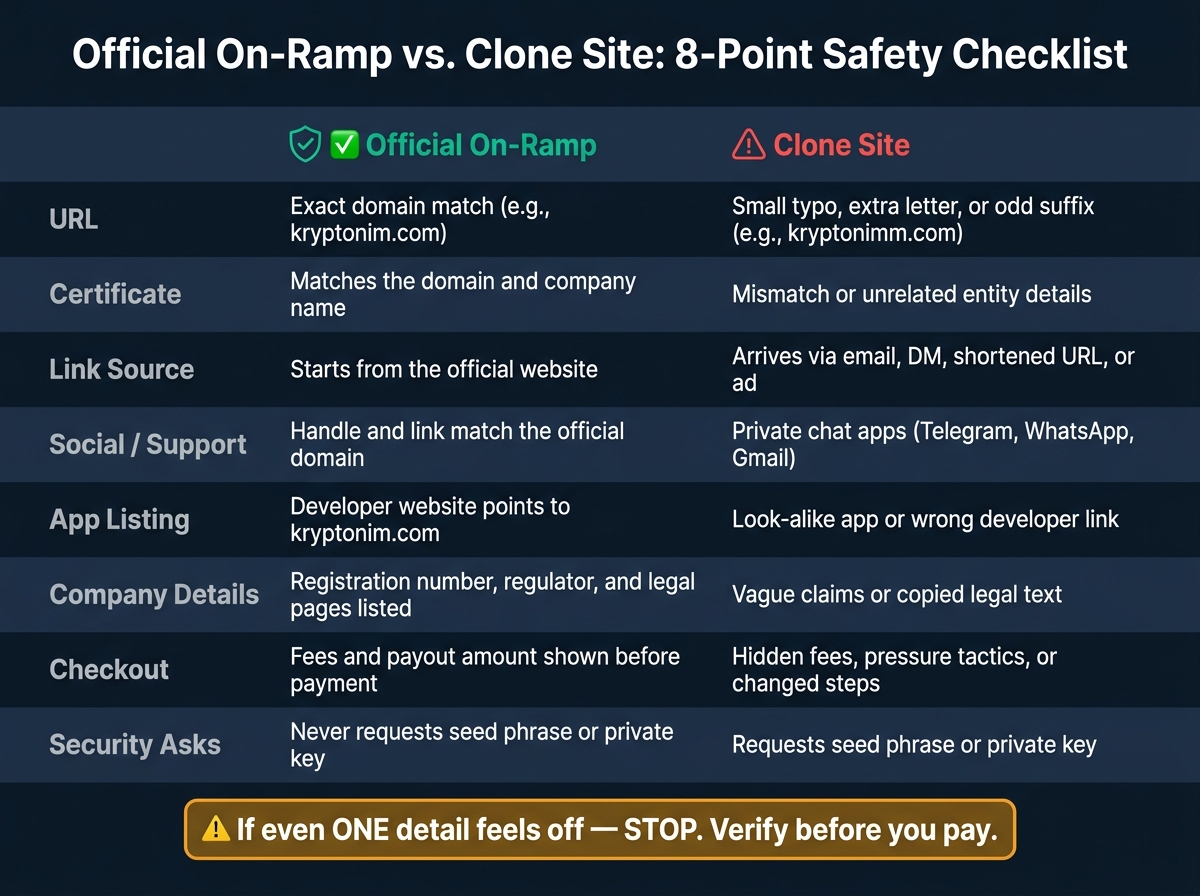
Official On-Ramp vs. Clone Site: 8-Point Safety Checklist
| Check | Official on-ramp | Clone site |
|---|---|---|
| URL | Exact domain match | Small typo, extra letter, odd suffix |
| Certificate | Matches the domain/company | Mismatch or unrelated details |
| Link source | Starts from the official site | Email, DM, shortened link, ad |
| Social/support | Matches the site domain | Private chat apps or fake handles |
| App listing | Developer website points to official domain | Look-alike app or wrong developer link |
| Company details | Registration, regulator, legal pages listed | Vague claims or copied legal text |
| Checkout | Fees and payout shown before payment | Hidden fees, pressure, changed steps |
| Security asks | No seed phrase/private key | Requests seed phrase/private key |
My rule is simple: if even one detail feels off, I stop. That small pause can save far more than the cost of a failed crypto purchase.
sbb-itb-0796ce6
Check the Exact URL Before You Do Anything
Before you log in or enter payment details, type Kryptonim's official URL yourself or use a saved bookmark. Then check the spelling character by character. Never use a link from an email, a direct message, or a social post.
How to Spot Subtle Domain Changes
Clone sites often make tiny domain changes that are easy to miss at first glance. For example, an attacker might register kryptonimm.com instead of the real domain.
Some go a step further and swap a Latin letter with a look-alike character from another alphabet. When that happens, your browser may show xn-- in the status bar when you hover over the link. That's a big warning sign.
The key point is simple: a cloned page can look exactly like the real one while the domain is completely wrong.
How to Use HTTPS and Read the Certificate
A padlock and https:// only tell you the connection is encrypted. They do not prove the site is legitimate.
Click the padlock and review the certificate. Make sure the domain matches Kryptonim exactly. If an organization name appears, it should match the company name.
If the certificate is issued to a different entity or an unrelated domain, stop right there. If the certificate doesn't match, don't keep browsing. Verify the source link before you proceed.
Why You Should Not Trust Sponsored Search Ads by Default
Search ads can put clone sites at the top of the results. That's why it's smarter to skip sponsored links and use a typed URL or saved bookmark instead.
If the domain, certificate, or search result still feels off, verify the link source and app publisher next.
How to Verify Every Link and App You Use
After you check the URL, check every other way a clone can reach you. Most fakes get in through three paths: shared links, fake social profiles, and copycat apps. The rule is simple: did this link or app come from the official site?
Start on the Official Site, Not from Shared Links
Before you trust any link or app, check where it came from. Start on the official site and open the buy page from there.
Use links that begin on the official site only. Ignore links sent through:
- text messages
- comments
- shortened URLs
How to Check Social Accounts and Support Contacts
Fake social accounts often copy a brand's profile photo and bio almost perfectly. If a social post says it’s from Kryptonim, check the handle letter by letter. Then confirm that the profile link goes to the official site. If it doesn’t, treat the account as suspicious.
Use only the support icon on the official site or the official support email. Reject Gmail, Telegram, and other private-channel requests.
If the link source looks right, check the app store listing the same way.
How to Confirm App Publisher Details in the App Store
The same rule applies in app stores: start from the official site, not from search results. Search can surface copycat apps with almost identical names and icons.
Once you open the listing, check the Developer Website link. It must point straight to https://www.kryptonim.com. If it points anywhere else, close the page.
Then check the app’s update history. It should look normal and active over time. A thin update history or a sudden burst of updates is a warning sign.
Kryptonim is not a wallet. If an app claims to be a Kryptonim Wallet, or asks for your seed phrase or private keys, it is fake.
Real vs. Fake On-Ramp: What to Look For
After you confirm the official app and social accounts, pause and check the site itself before you enter any payment details. The site should line up with the brand you already verified elsewhere.
Domain, Branding, and Company Details
A real site stays consistent from page to page. It also tells you who runs it. That means the legal entity, registration number, and regulator should be plainly listed. Kryptonim, for example, lists registration number RDWW-649 and says it is authorized by the Polish Financial Supervision Authority (KNF).
Clone sites tend to get fuzzy here. They may say they're "fully regulated" but never name the authority. Or they show legal pages that look copied and pasted. Support details should also match the official domain and the public help page.
Use this quick checklist:
- Domain - exact and consistent across every page, such as
kryptonim.com - Regulatory info - named legal entity, registration number, and regulator
- Legal pages - full Terms, Privacy Policy, and AML/KYC disclosures that are present and readable
- Support contact - matches the official domain and public help page
If those details line up, then it makes sense to move on to payment and login behavior.
Payment and Login Red Flags
Checkout is often where clone sites slip up. A legitimate on-ramp shows the final crypto amount, including fees, before you pay. If that number appears only after you've entered payment details, stop.
Some warning signs are hard to miss:
- Countdown timers pushing you to pay right away
- Unexpected manual transfer instructions during checkout
- Requests for a second payment to "release" your first transaction
- Requests for a seed phrase or private key - never enter either
KYC should also be explained before payment. If a site asks for documents only after payment has been submitted, treat that as a red flag.
If any of these signs show up, stop and check the source again before paying.
A 5-Step Safety Routine to Run Every Time
Use this quick check after you verify the URL, links, and app source. Run it before you fund any purchase.
Steps 1 Through 5 Before Funding a Purchase
- Type the URL yourself. Go straight to the official site by entering the address in your browser’s address bar.
- Check the spelling and certificate. Make sure the domain is spelled exactly right. Watch for extra hyphens, switched letters, or odd suffixes. Then click the lock icon and confirm the certificate is issued to the exact domain and company name. If that lines up, move on to the source of the link.
-
Confirm the link source. Use only links that lead back to official
kryptonim.compages. If the source doesn’t, close the tab. -
Match the company details. Support should be available through on-site chat or
[email protected]- not through Telegram, WhatsApp, or any other unofficial channel. After the site identity checks out, look over the payment screen before you enter card details. - Review the payment screen before paying. If common crypto trading fees show up only after you enter your card, or the instructions change in the middle of checkout, stop and go back to step one.
Final Takeaway: Slow Down Before You Pay
Each step above checks for a common trick used by clone sites: typo domains, unverified certificates, unofficial links, missing company details, and hidden fees at checkout.
If anything looks off, stop and verify it again before paying.
FAQs
What should I do if I already clicked a suspicious on-ramp link?
If you clicked a suspicious link, stop using the site right away. Don’t enter any personal details, login information, or recovery phrases.
If you already typed in details or connected your wallet, change your account password and email password immediately. Then check your search history to find the fake site, report it through the platform’s verified support channels, and review your account for unauthorized changes, such as new device logins or edited withdrawal addresses.
How can I tell if an app store listing is fake?
Don’t rely on a polished app page or high download numbers alone. Before you download anything, check that the publisher name and listed details match the company info on its verified website.
It also helps to compare the app’s branding, support contact info, and company details to make sure they line up. And skip links in ads or unsolicited messages. Instead, go to the app store from an official, trusted website.
Why isn’t the padlock enough to trust a site?
A padlock icon and HTTPS only mean your connection to the site is encrypted. They do not prove the site owner is legitimate.
Scammers can get valid certificates for phishing sites, so copycat sites can show a padlock too. That’s why it’s smart to check the exact domain spelling, confirm details in official regulatory registers, and avoid links from ads, text messages, or unsolicited emails.