
How to Spot Fake Wallet Apps and Sites
If you can’t verify who runs a crypto wallet, stop—logos and HTTPS don’t prove safety.
I check who runs a wallet app before I install it, connect my wallet, or pay. A familiar logo, HTTPS, and five-star reviews don’t prove it’s safe.
Here’s my checklist:
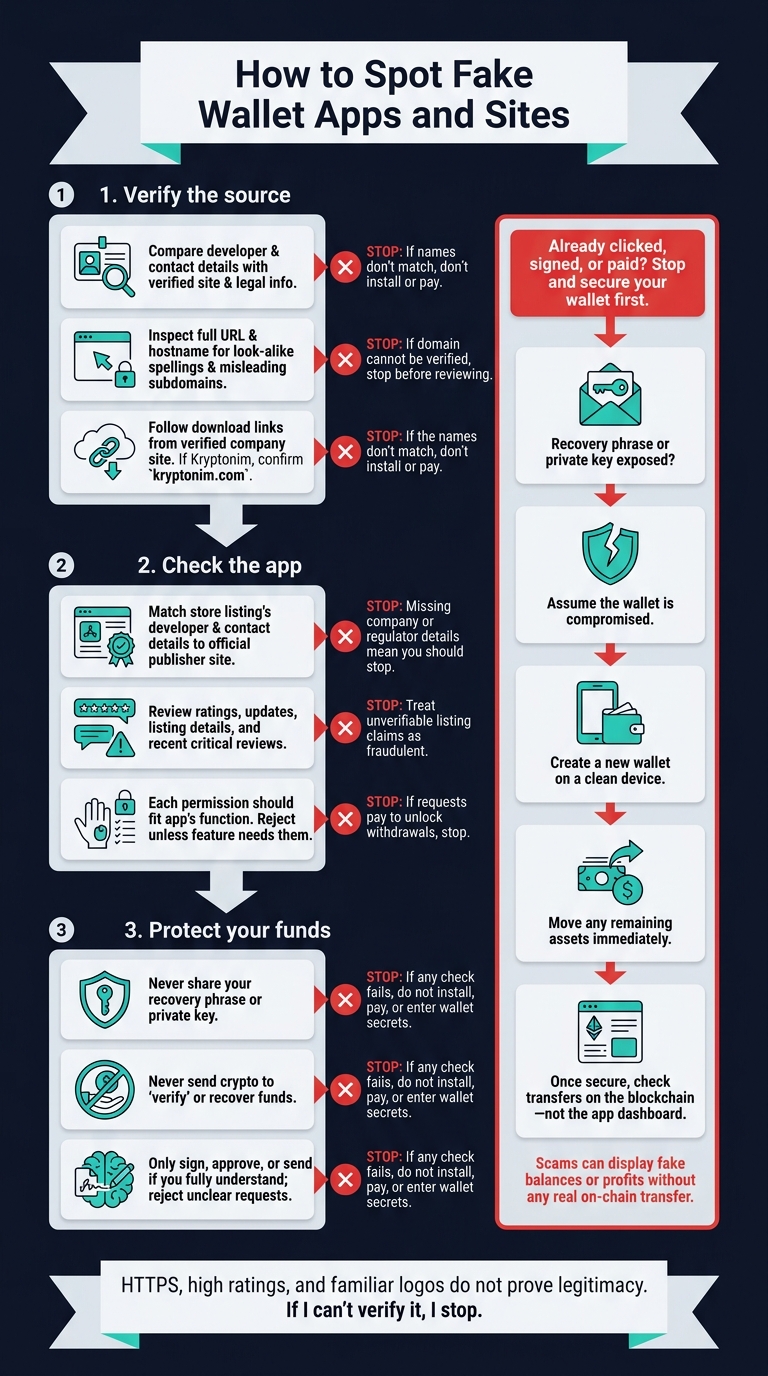
- Verify the source: Match the publisher’s name and contact details, inspect the exact domain, and follow download links from the verified company site.
- Check the app: Review its listing, permissions, withdrawal complaints, and claims about returns.
- Protect my funds: Never share wallet secrets, pay a verification fee, or sign something I don’t understand. If checkout uses Kryptonim, check for
kryptonim.com. - Act after exposure: If I shared a recovery phrase or private key, move remaining assets to a new wallet created on a clean device. Then check transfers on the blockchain - not the app’s balance display.
My rule: <u>if I can’t verify it, I stop</u>. Looking safe isn’t the same as being safe.
How to Spot Fake Wallet Apps and Sites
Verify the publisher and domain
Before you install or pay, check the developer name, contact details, and URL together to confirm who’s behind the product.
Confirm the developer and contact details
Compare the developer name and contact details with the company’s verified site and legal information. Watch for altered spellings or conflicting company names. If the names don’t match, don’t install or pay.
Inspect domains and link destinations
Use a URL you’ve verified through another source. Check the full URL, then the hostname. Watch for look-alike spellings and misleading subdomains, and check the final domain again after any redirect.
A product name in a subdomain or after a slash doesn’t prove ownership. If the domain doesn’t pass these checks, stop before reviewing app listings or permissions.
Verify the Kryptonim domain before paying
If checkout uses Kryptonim, confirm that the domain is kryptonim.com before entering payment details. If you’re redirected, verify the new domain using confirmed company contact details before continuing.
sbb-itb-0796ce6
Review app listings, permissions, and downloads
After checking the publisher and domain, review the store listing, app permissions, and download source.
Review ratings, updates, and listing details
Read recent critical reviews. Look for withdrawal delays, forced top-ups, or praise that sounds nearly identical across reviews. Missing company or regulator details mean you should stop.
Watch for guaranteed returns or balances that don’t match on-chain activity. If you can’t verify the listing’s claims about withdrawals, returns, or balances, treat the app as fraudulent.
Question unnecessary app permissions
Check permissions before installing. Each permission should fit the app’s function. Requests for access beyond that are a warning sign.
Reject requests for contacts, SMS, accessibility, overlay, and device-admin access unless a wallet feature clearly needs them.
Use official downloads and check warning signs
Download only from the official publisher site. Then check that the store listing uses the same developer name and contact details. If the app or installer asks you to pay to unlock withdrawals, stop and verify before proceeding.
| Check | Supporting evidence | Warning sign | Action |
|---|---|---|---|
| Company details | Full legal entity and regulator details | Missing details or details you can’t verify | Confirm through verified publisher contacts |
| Financial promises | No guaranteed returns | Promises of guaranteed returns | Do not install until resolved |
| Withdrawal process | Clear, traceable on-chain transactions | Demands a top-up before withdrawal or payment to unlock funds | Stop and investigate |
| User reviews | Recent critical feedback about withdrawals | Nearly identical positive reviews or complaints about unavailable withdrawals | Investigate before installing |
If any check fails, do not install, pay, or enter wallet secrets.
Protect wallet secrets and respond to fraud
Reject secret requests and verification fees
If you already clicked, signed, or paid, stop and secure your wallet first.
Never share your recovery phrase or private key. Never send crypto to “verify” or recover funds.
Only sign, approve, or send something if you fully understand it. If a request is unclear, reject it.
If you exposed a secret, act immediately.
Respond based on what you exposed
If you exposed your recovery phrase or private key, assume the wallet is compromised. Create a new wallet on a clean device, then move any remaining assets immediately. Once you have a secure crypto wallet, you can safely manage your holdings.
Verify on-chain activity
Once your wallet is secure, check whether any assets actually moved on-chain. Check the blockchain - not the app dashboard. Scams can display fake balances or profits without any real on-chain transfer.
Conclusion: verify before installing or paying
Check who’s behind the tool - not just how it looks. Confirm the publisher, inspect the domain, and check listing links against the official site. Question permissions the tool doesn’t need, and download only from verified sources.
HTTPS, high ratings, and familiar logos do not prove legitimacy.
If you can’t verify who runs the tool or understand what a request does, stop before installing or paying. Don’t sign an approval you don’t understand or transfer funds.
FAQs
How can I independently verify a wallet publisher?
Check the wallet publisher’s official website for its regulatory status and licensing details. Then verify those claims in official regulatory registries. Read independent forums like Reddit and review sites like Trustpilot to learn about users’ experiences.
Download software or extensions only from official sources. Fake versions often copy popular brands and use misleading reviews to steal private keys.
What if I connected my wallet to a fake site?
Act now: disconnect your device from the internet to stop further access by anyone without your permission. Use a separate, secure device to change passwords for any accounts that may be at risk.
If you think your wallet has been compromised, move any remaining funds to a new, secure wallet as soon as possible.
Watch your accounts for unusual activity, and consider turning on two-factor authentication for added security.
How do I report a fake wallet app?
Report a fake wallet app or website directly to the company being impersonated. This helps the company take action and warn other users. Include the fake site's web address or where you found the app so the team can investigate.
You can also use browser security extensions that check databases of reported scam sites. These tools can help block threats for you and other users.