
Public and Private Keys in Crypto Explained
How public addresses receive funds, private keys sign transactions, and how to protect seed phrases and wallets.
If someone has your private key or seed phrase, they can spend your crypto. If they only have your public address, they can only send crypto to you.
That’s the whole topic in one view. In crypto, your wallet does not hold coins inside the app or device. It holds access to funds recorded on the blockchain. One key is public and made for receiving. The other is private and used to approve transfers. A private key is 256 bits long, and most wallets back it up with a 12- or 24-word recovery phrase.
Before I use any wallet, I keep these points in mind:
- Public address = receive funds
- Private key = approve spending
- Seed phrase = backup for the private key
- If I lose the private key or seed phrase, I may lose access for good
- If I expose either one, my wallet can be drained
- A hardware wallet keeps the private key off the internet
Here’s the short version: I can share my wallet address with anyone who wants to pay me, or use it to buy crypto for myself. I should never share my private key or recovery phrase with anyone, including fake support agents, random websites, or browser pop-ups. Control of the key means control of the funds.
This article explains how the two keys work together, how wallets sign transactions, why the blockchain stores the balance instead of the wallet app, and what I should do to keep access safe.
What public and private keys do in crypto
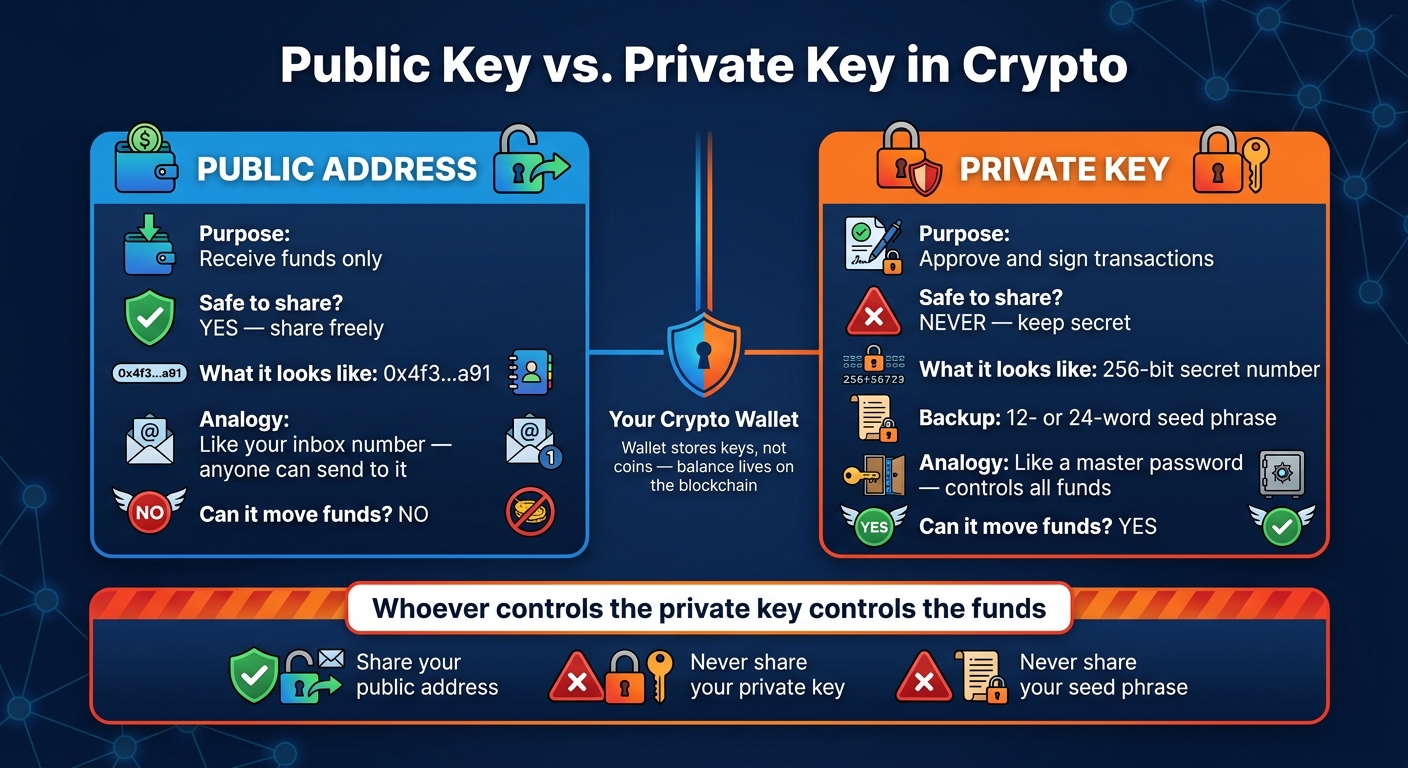
Public Key vs Private Key: Crypto Wallet Security Explained
A wallet uses two linked keys: one you can share and one you must keep secret. Each has a different job inside the wallet.
Public key: the shareable side of a wallet
A public key is a long cryptographic value. Wallet software turns it into a shorter wallet address through hashing and encoding. That wallet address is what you share when you want someone to send you crypto.
Think of it like an inbox number. People can use it to send funds to you, but they can't use it to send funds out. A public key or address can't move funds on its own. It's only for receiving. Spending still needs the private key.
Private key: the secret that controls your funds
The private key is a 256-bit secret number. When you send crypto, your wallet uses that key to sign the transaction. The network then checks the signature with the public key, without showing the private key.
That setup is the whole point. You prove you have the right to spend the funds without handing over the secret itself.
Whoever controls the private key controls the funds linked to it. If someone else gets that key, they can move the assets just as easily as the original owner. That's why private key security matters so much. The signature is what authorizes a crypto transfer.
sbb-itb-0796ce6
How wallets use key pairs
Your wallet manages access, not the coins themselves
With the keys in place, the next piece is the wallet itself: where those keys sit and how the wallet uses them. Your balance lives on the blockchain, not inside your wallet. The wallet stores the keys that let you reach and use that balance.
Delete a wallet app, and your funds don't vanish. You only remove that access point, unless you failed to back up your recovery phrase.
The way a key is stored depends on the wallet type:
| Wallet type | Where the private key lives | How transactions are signed |
|---|---|---|
| Software wallet | Encrypted storage on your phone or computer | Signed by the app on your device |
| Hardware wallet | Inside a secure offline chip | Signed inside the device; the key never leaves it |
Hardware wallets are built to keep the private key off the internet. When you approve a transaction, the wallet app sends unsigned transaction data to the device. The device signs it internally and sends back only the signature. The private key stays offline the whole time. That's a big reason hardware wallets are often recommended for long-term storage.
How the private key and public key are linked
This one-way link is what makes public addresses safe to share. The public key comes from the private key. Your wallet runs the private key through a one-way calculation on an elliptic curve to create the public key.
Going in reverse is computationally infeasible. In plain English, someone can't work backward from your public key or wallet address to figure out your private key. Even if a person watches every transaction tied to your address, they still can't realistically reverse-engineer the private key from that data.
How keys work when sending and receiving crypto
When you send or receive crypto, each key does a different job. This is how it plays out in a normal transfer.
Receiving crypto with a public address
Your wallet gives you a public address for receiving funds. That’s the wallet address tied to your public key. Anyone can send crypto to that address, and once the transaction is sent, it gets broadcast to the network and recorded on the blockchain.
Crypto transfers are usually irreversible. So before you send anything, double-check the address and the network. It’s also smart to send a small test transfer first.
Sending crypto with a private key signature
Receiving uses your public address. Sending is different: it requires your private key. Your wallet uses that private key to sign the transaction, which creates a digital signature. The network then checks that signature using your public key.
Never enter your private key into any site, app, extension, or message you don’t trust. Since the private key gives permission to spend funds, keeping it safe is the next thing to focus on.
How to keep your private key safe
What happens if you lose or expose a private key
Your private key is what approves transactions. That’s why both losing it and exposing it are serious problems.
If you lose your private key, you lose access to your funds for good. The funds still sit on-chain, but you can’t get to them.
If you expose your private key, someone else can use it to sign transactions and empty your wallet right away.
Your seed phrase is the backup for your private keys. When you set up a wallet, you usually get a 12- or 24-word recovery phrase. That phrase can recreate your wallet’s private keys, so it needs the same level of protection as the key itself.
Basic rules for storing and sharing key information
Treat your private key and its backup with the same care.
The main rule is simple: your public address is safe to share; your private key and seed phrase are not. People can use your receiving address to send you crypto, but they can’t use it to move funds out. Your private key and seed phrase are different. Those can be used to move funds, so never share them with anyone, including people claiming to be support staff. Legitimate services will never ask for them.
For storage, write your seed phrase on paper and keep it in a secure physical place. Do not store it in screenshots, email drafts, cloud notes, or unencrypted text files. Malware can scan those places for seed phrases and private keys. If your device gets compromised, anything stored digitally in plain text is exposed.
If you hold larger amounts, a hardware wallet keeps the private key offline and signs transactions inside the device.
Key takeaways before you use a crypto wallet
Before you use a wallet, keep two basics in mind: public addresses receive funds and private keys sign transactions. A wallet stores and uses your keys so you can access funds recorded on-chain.
Here’s the part that matters most: whoever controls the private key controls the funds. If you don’t hold the private key, you don’t have direct control over those funds. That’s the main difference between custodial services and self-custody wallets.
The same rule applies if you buy crypto through Kryptonim. Funds go straight to the wallet address you provide. If you want direct control, send them to a self-custody wallet and protect the recovery phrase.
Never share your private key or recovery phrase. If you lose either one - or someone else gets access to it - you could lose your funds. Protect your private key and recovery phrase first. Everything else starts there.
FAQs
Can one seed phrase restore multiple wallet addresses?
Yes. A single recovery phrase, often called a seed phrase, can restore access to your wallet. It does this by regenerating your wallet’s private key and the wallet addresses linked to it.
That’s the whole point of it: if your device is lost, stolen, or damaged, you can get back into your wallet as long as you still have the exact 12 to 24 words.
One small detail matters a lot here: the words must be exactly right and kept secure. If even one word is wrong, or the order is off, recovery may fail.
Does a new wallet app change my blockchain balance?
No. A new wallet app does not change your blockchain balance.
Your cryptocurrency is recorded on the blockchain, not inside the app. The wallet is simply a tool that lets you access and manage those funds with your private keys.
If you import your existing private keys or recovery phrase into a new wallet app, you’ll see the same balance.
What should I do if I think my seed phrase was exposed?
If you think your seed phrase was exposed, act fast. Stop using that wallet or key right away, create a new wallet with a new secure key pair, and move your funds there as soon as you can.
If the wallet has linked permissions or certificates, revoke them too. Your seed phrase is the master key to your funds, so moving your assets fast matters.