
"Not Your Keys, Not Your Crypto" - What It Means in Practice
Control your private keys to truly own crypto: learn non-custodial wallets, backups, and practical steps to secure your seed phrase.

"Not your keys, not your crypto" means you don’t truly own your cryptocurrency unless you control the private keys. If you rely on third-party platforms like exchanges, you’re trusting them to safeguard your assets. But history shows this can be risky - platforms like FTX collapsed, freezing billions in user funds.
To secure your crypto, use non-custodial wallets, which let you control your private keys. Options include hardware wallets (e.g., Ledger, Trezor) and software wallets (e.g., MetaMask). However, managing your private keys comes with responsibility:
- Keep your private keys safe: Use physical backups (preferably metal), store them securely, and never share them.
- Avoid custodial risks: Centralized platforms are vulnerable to hacks, insolvency, or account freezes.
- Use non-custodial wallets: They give you full control and privacy over your funds but require careful handling of recovery phrases.
Taking control of your private keys ensures your funds are secure and under your ownership. Follow best practices to avoid losing access to your assets.
Private Keys and Public Keys Explained
To grasp why controlling your keys is so important, you need to understand how private and public keys work together. Picture your public key as your bank account number - it's fine to share with anyone who wants to send you money. Meanwhile, your private key is like the password or PIN that allows you to access and manage those funds.
On a technical level, a public key is generated from a private key using a one-way process called a trapdoor function. This means it's straightforward to create a public key from a private key, but practically impossible to reverse the process. Even modern computers can't crack this.
When someone sends cryptocurrency to your wallet, they use your wallet address, which is a shorter, hashed version of your public key that's easier to share. The actual funds remain on the blockchain; what changes is the record of ownership and who has the right to spend them. Now, let’s break down how these keys work to keep your transactions secure.
How Private Keys Work
Private keys are the backbone of transaction security. A private key is a 256-bit randomly generated number, meaning there are 2^256 possible combinations. This secret code is what proves you own the cryptocurrency linked to your wallet address.
When you send cryptocurrency, your wallet uses your private key to create a digital signature. This unique signature verifies your authorization without revealing your private key. As Ledger Academy explains:
"A signature is like a digital fingerprint; it proves to the blockchain that you intend to carry out the plan in the attached message."
The blockchain network then uses your public key to confirm that the signature is valid and that the transaction hasn't been altered. If even a small detail - like the recipient's address or the amount - changes after signing, the signature becomes invalid.
Because your private key grants full control over your funds, it must be protected at all costs. If someone gains access to it, they can take your assets, and there's no way to reverse it. Unlike traditional banking, decentralized finance doesn’t offer a "forgot password" option. Lose your private key without a backup seed phrase, and your funds are permanently locked on the blockchain.
The Role of Public Keys
While private keys handle transaction authorization, public keys ensure that all transactions are verifiable on the blockchain.
Public keys serve two main purposes: receiving funds and verifying transactions. You can share your public key freely since it only allows others to deposit funds into your account.
| Feature | Public Key / Address | Private Key |
|---|---|---|
| Function | Receiving funds and identifying accounts | Authorizing transactions and proving ownership |
| Visibility | Publicly shareable on the network | Must be kept strictly confidential |
| Analogy | Mailing address or account number | The key to a mailbox or a digital password |
| Security Risk | Low (safe to share) | High (exposure leads to total loss of funds) |
Patrick Dike-Ndulue, Editor at Tangem Blog, offers a simple analogy:
"Think of the public key as your email address and your private key as your password. Anyone can send you an email, but only you can read it by entering your password."
In short, your public key allows you to safely receive funds, while your private key ensures you alone can spend them. Understanding this relationship is the first step in taking full control of your cryptocurrency. Next, we’ll explore how to secure your keys and manage different wallet options.
sbb-itb-0796ce6
Risks of Custodial Services
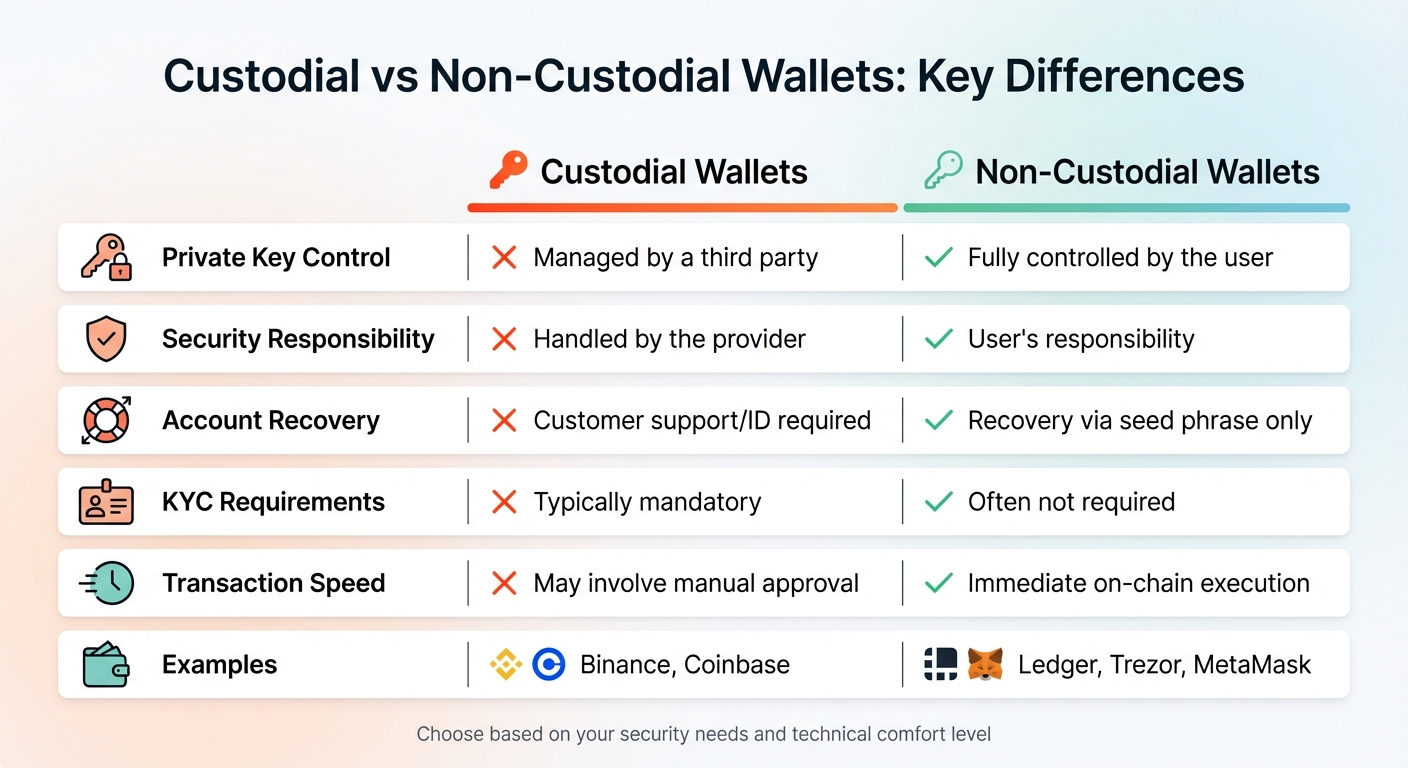
Custodial vs Non-Custodial Crypto Wallets Comparison
Storing cryptocurrency on a custodial platform essentially means you're holding an IOU from the company managing the platform. These platforms control the private keys, giving them ultimate authority over your funds - and this comes with several serious risks.
Main Risks of Custodial Services
Hacking and platform insolvency are the biggest concerns. Centralized exchanges are prime targets for cyberattacks because they store billions of dollars in "hot wallets", which are connected to the internet. In 2022, crypto hacks accounted for an estimated $3.7 billion in losses, though this figure dropped to about $1.7 billion in 2023. Additionally, if a custodial service goes bankrupt, your funds could be frozen indefinitely or used to settle the company’s debts. Some platforms don't even maintain full reserves, meaning they don't actually hold all the assets reflected in user balances.
Account freezes can happen without notice. Custodial platforms can block access to your funds due to regulatory issues, suspected fraudulent activity, or changes in their internal policies. Unlike traditional banks, which typically offer consumer protections, crypto exchanges operate under inconsistent regulations. Problems like identity verification failures or sudden rule changes could leave you locked out of your funds.
At the heart of these risks is counterparty risk - your reliance on the platform’s security measures, financial stability, and integrity. As Ledger explains:
"By having the private keys, you can set your own rules. There won't be anyone else telling you what you can or cannot do with your crypto".
Considering these risks, it’s worth evaluating custodial platforms against the alternative: non-custodial wallets.
Custodial vs. Non-Custodial Wallets
These risks highlight why many crypto users choose non-custodial wallets. Here’s a side-by-side comparison:
| Feature | Custodial Wallets | Non-Custodial Wallets |
|---|---|---|
| Private Key Control | Managed by a third party | Fully controlled by the user |
| Security Responsibility | Handled by the provider | User’s responsibility |
| Account Recovery | Customer support/ID required | Recovery via seed phrase only |
| KYC Requirements | Typically mandatory | Often not required |
| Transaction Speed | May involve manual approval | Immediate on-chain execution |
| Examples | Binance, Coinbase | Ledger, Trezor, MetaMask |
Custodial wallets function similarly to traditional banking, where the institution has ultimate control over your account. On the other hand, non-custodial wallets give you direct control of your crypto assets - but with that freedom comes the responsibility of safeguarding your private keys.
Benefits of Non-Custodial Wallets
When you control your private keys, you hold direct ownership of your cryptocurrency. Non-custodial wallets give you this control, ensuring your on-chain tokens are entirely in your hands. As SatoshiLabs explains:
"A self-custodial wallet gives you 100% control over your assets. You don't have to trust a third-party custodian with your assets. You're in charge."
This setup also provides censorship resistance, meaning no government, bank, or corporation can freeze your funds or block transactions. With your keys, you’re free to connect directly to decentralized applications (dApps), engage with DeFi platforms like Uniswap or SushiSwap, collect NFTs, and even vote in DAOs - features that custodial wallets or exchange accounts often can’t offer.
Main Advantages of Non-Custodial Wallets
Non-custodial wallets address the risks that come with custodial services by offering greater control and security.
- No Counterparty Risk: You avoid the dangers of trusting third parties. High-profile incidents have highlighted how risky it can be to rely on external custodians.
- Enhanced Privacy: Non-custodial wallets don’t require identity verification, allowing for more anonymous transactions. You can even generate a new public address for each transaction, which helps keep your activity private.
- Fee Customization: Unlike custodial services with fixed fees, non-custodial wallets let you set your own transaction fees.
However, full control also comes with full responsibility. If you lose your seed phrase, there’s no customer support to help recover your funds, making security a top priority.
Once you understand these benefits, the next step is learning how to set up your non-custodial wallet.
How to Set Up a Non-Custodial Wallet
Setting up a non-custodial wallet is straightforward, whether you choose a hardware wallet like Ledger or Trezor, or a software wallet like MetaMask. Hardware wallets typically take about 10–15 minutes to set up, while software wallets such as MetaMask can be ready in just a few minutes. Both options provide complete control over your private keys, but the steps involved differ slightly.
Setting Up Hardware Wallets (Ledger, Trezor)
When you receive your hardware wallet, start by carefully inspecting the packaging for any signs of tampering, like broken holographic seals over the USB port. To ensure security, download the official companion app directly from the manufacturer’s website. Ledger, for instance, is trusted by over 8 million users globally, and Trezor’s Safe 3 model is available for $59.
For security reasons, hardware wallets usually ship without pre-installed firmware. Once you connect the device, the app will guide you through installing the latest firmware. After that, the device will generate a recovery seed, which is usually a sequence of 12, 20, or 24 words. This recovery seed is critical for restoring your wallet if needed. As the Trezor Knowledge Base advises:
"Your backup is the only way to recover your wallet. Write all 12 words in the exact order... If the words are lost or written incorrectly, your wallet cannot be recovered."
– Trezor Knowledge Base
Write the recovery seed on the provided paper cards or a metal backup, but never store it digitally. Next, set up a PIN code to secure your wallet against unauthorized access. Some devices allow a PIN up to 50 digits long. Trezor, for example, lets you make up to 16 incorrect PIN attempts before the device erases all stored data. To ensure accuracy, use tools like Trezor’s "Recovery Check" to confirm your written recovery phrase matches the device.
With your hardware wallet ready, let’s move on to software wallets.
Setting Up Software Wallets (MetaMask)

MetaMask is one of the most popular software wallets, with over 21 million monthly active users. To get started, download MetaMask only from its official website or verified app stores. Once installed, open the app and select "Create a wallet" to begin the setup process. MetaMask offers two security options: a Secret Recovery Phrase (SRP) for self-custody or a Social Login using Google or Apple accounts with key sharding.
The traditional SRP method generates a unique 12-word recovery phrase that serves as the master key to your wallet. As the MetaMask Help Center explains:
"Whoever has the SRP has full control over the assets in a given wallet."
– MetaMask Help Center
Write the 12-word SRP in order on paper and store it in a safe, offline location. You’ll also create an app password for everyday use, but remember that only the SRP can recover your wallet.
Before transferring significant funds, it’s a good idea to verify your recovery phrase by performing a test restoration. Following these steps ensures you maintain full control and security over your assets.
How to Protect Your Private Keys
After setting up your wallet and recording your recovery phrase, the next step is keeping your private keys safe from theft, loss, or damage. Between 2022 and 2023, cryptocurrency theft amounted to $5.4 billion, and an estimated 3 to 4 million BTC (about 20% of the total supply) is believed to be permanently lost due to misplaced keys. Protecting your private keys is the cornerstone of cryptocurrency ownership.
Backup Methods for Private Keys
A crucial rule: never store your seed phrase digitally. This means no screenshots, no cloud storage, no password managers, and no email drafts. Jibran Mirza, Education Lead at Coin Bureau, highlights the danger:
"Digital storage turns your seed phrase into a breach collectible. 'Encrypted' is not the same as 'safe forever.'"
– Jibran Mirza, Education Lead, Coin Bureau
The LastPass breach in late 2022 illustrates this risk. Attackers accessed customer vault backups, which led to the theft of millions in cryptocurrency from users who had stored their seed phrases in "secure" notes.
For physical backups, paper is vulnerable to fire, water, and wear over time. A better alternative is a metal backup made from stainless steel or titanium, which can endure extreme conditions like high heat and water exposure. Options for metal backups range from DIY solutions to high-end models.
Distribute your backups geographically. Keep 2–3 copies in separate secure locations, such as a home safe and a bank deposit box. This ensures that a single disaster - like a fire or flood - won't destroy all your backups. When creating your backup, prioritize privacy: disable smart assistants, cover webcams, and ensure no cameras are present.
If your wallet uses the BIP39 standard, keep in mind that only the first four letters of each word in the seed phrase are needed for recovery. Double-check the word count, spelling, and order against your wallet's display. Perform a "dry-run" recovery test with a small amount of funds before moving larger amounts. For extra security, consider adding a passphrase (sometimes called the "25th word"). This creates a hidden wallet that requires both your seed phrase and the passphrase to access. Be sure to store the passphrase separately from your primary seed phrase for added protection.
Once your backups are secure, the next step is avoiding common mistakes that could compromise your keys.
Common Mistakes to Avoid
Never share your recovery phrase. Legitimate support teams will never ask for it. As Jibran Mirza from Coin Bureau explains:
"Legit support will NEVER ask for your seed phrase. Never."
– Jibran Mirza, Education Writer, Coin Bureau
Scammers often pose as support staff on platforms like Discord, Telegram, or social media and claim they need your keys to resolve an issue. Sharing your recovery phrase puts your assets at immediate risk.
Another pitfall is relying on a single backup. Many high-profile cases of lost funds involve users who didn’t create multiple backups. Always store backups in multiple, secure locations.
When purchasing a hardware wallet, always buy directly from the manufacturer’s official website or authorized sellers. Third-party marketplaces may sell tampered devices with pre-configured scams. Upon receiving your hardware wallet, inspect the packaging for signs of tampering.
Lastly, avoid using easy-to-guess PINs like "1234" or birthdays. If your device is stolen, a strong PIN can prevent unauthorized access. Many hardware wallets, such as Ledger (after 3 failed attempts) and Trezor (after 16 failed attempts), will reset to factory settings if someone tries to brute-force the PIN. To stay on top of your security, check your physical backups quarterly and perform an annual recovery dry-run to ensure everything is functioning properly.
Conclusion: Take Control of Your Crypto
The saying "not your keys, not your crypto" sums up the essence of true cryptocurrency ownership. When you control your private keys, you truly own your assets. Without them, you're placing trust in a third party rather than having direct control. Earlier, we explored how non-custodial wallets give you the power to manage your crypto independently.
By carefully setting up a non-custodial wallet - whether it's a hardware option like Ledger or Trezor, or a software wallet like MetaMask - you take control of your funds. This step helps you sidestep risks like exchange collapses, frozen accounts, or unauthorized access. Following the setup instructions ensures your crypto stays under your control.
Self-custody brings both freedom and responsibility. Protect your seed phrase by creating durable backups and storing them securely in multiple locations. Never share it, and test your backups with small transactions before transferring larger amounts. Avoid risky practices like storing your seed phrase digitally or using weak PINs.
Taking charge of your crypto is about more than just security - it’s about financial independence. With self-custody, you control your money without interference from banks, governments, or centralized platforms. Start small, build good habits, and gradually move your holdings to wallets where you hold the keys. The steps you take today can safeguard your assets for years to come.
FAQs
What happens if I lose my seed phrase?
Losing your seed phrase means losing access to your private keys, which are critical for managing your cryptocurrency. Without it, there’s no way to recover or access your funds, as the seed phrase is the ONLY method to restore your wallet if your device is lost or damaged. To prevent irreversible loss, make sure to store your seed phrase securely and protect it from theft or damage.
Should I use a hardware wallet or a software wallet?
Choosing the right wallet comes down to balancing security with convenience. Hardware wallets keep your private keys offline, making them highly secure and a great choice for storing large amounts or holding assets long-term. On the other hand, software wallets live on your device, offering easier access for regular transactions but exposing you to potential online risks. If you're just starting out, the added security of a hardware wallet can be a smart move.
How do I safely move crypto off an exchange?
To securely transfer cryptocurrency off an exchange, move it to a self-custody wallet where you control the private keys. Here's how:
- Pick a reliable self-custody wallet: This could be a hardware wallet for added security or a software wallet for convenience.
- Generate your wallet address and private key/seed phrase: This step ensures your wallet is ready to receive funds.
- Withdraw from the exchange: Use your wallet’s public address to initiate the transfer.
- Protect your private keys: Store them offline to guard against theft or accidental loss.
By taking these steps, you ensure full control and added security for your crypto assets.