
Ledger vs Trezor vs BitBox: Cold Wallet Guide
Compare Ledger, Trezor, and BitBox02 on security, backups, mobile use, and asset support to choose the right cold wallet.
If I had to boil it down fast: Ledger is the pick for lots of coins and phone use, Trezor is the pick for open-source focus and clear recovery steps, and BitBox02 is the pick for Bitcoin-first use and simple backup flow.
Most wallet losses do not happen because a device touched the internet. They usually happen when someone leaks a recovery phrase or approves the wrong transaction. So when I compare these three wallets, I look at the stuff that matters most in daily use:
- Setup: how easy it is to buy crypto and get started
- Backup: seed phrase, passphrase, or microSD backup
- Apps: desktop vs. mobile, cable vs. Bluetooth
- Assets: Bitcoin-only use vs. 5,500+ coins and tokens
- Fit: which wallet makes sense for your habits
Here’s the short answer:
- Choose Ledger if you want the broadest coin and token support, plus the best phone experience.
- Choose Trezor Safe 3 if you care most about open-source code and a guided recovery process.
- Choose BitBox02 if you mostly hold Bitcoin and want a simple setup with microSD backup.
Quick Comparison
| Wallet | Best for | Backup style | Mobile use | Asset range |
|---|---|---|---|---|
| Ledger Nano X | Multi-asset users | 24-word recovery phrase | Strong; iOS + Android, Bluetooth | Broadest |
| Trezor Safe 3 | Open-source and desktop users | 12- to 24-word seed, passphrase, Shamir on some models | Limited; cable-first | Broad, but less than Ledger |
| BitBox02 | Bitcoin-first users | microSD backup + seed fallback | Limited; Android/desktop, no iOS app | Smaller list |
A few facts stand out right away: Ledger Nano X is the most phone-friendly, Trezor Safe 3 gives you a more open design, and BitBox02 cuts down setup mistakes by using an automatic backup card flow. If you know your coin list and how you want to store your recovery data, the choice gets much easier.
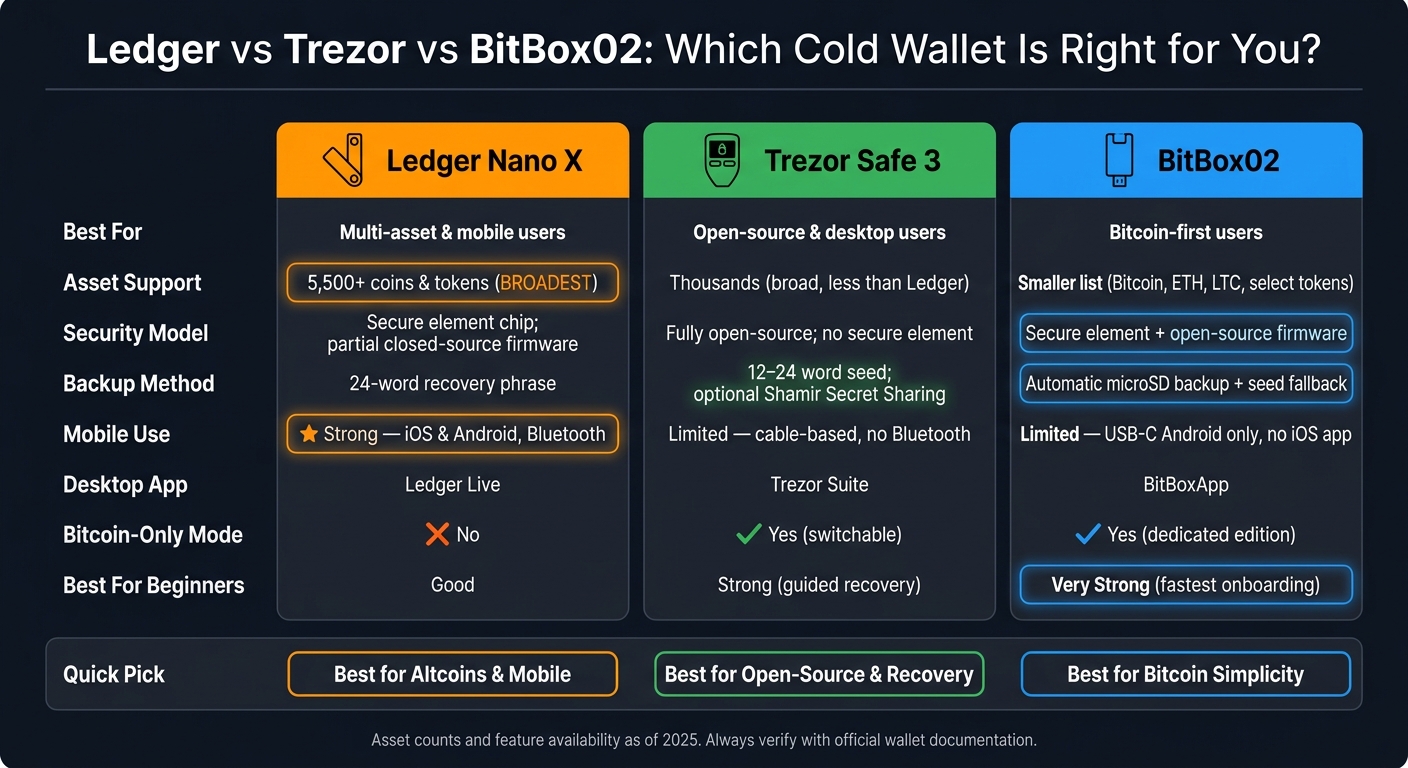
Ledger vs Trezor vs BitBox02: Cold Wallet Comparison Chart
Key differences to check before you buy
The main tradeoffs get a lot easier to spot when you line these wallets up side by side.
| Factor | Ledger Nano X | Trezor Safe 3 | BitBox02 |
|---|---|---|---|
| Security approach | Secure element chip; some firmware remains closed-source | Fully open-source hardware and firmware; no secure element | Secure element plus open-source firmware; builds you can verify against the source |
| Backup method | 24-word recovery phrase; optional Ledger Recover service | 12- to 24-word seed phrase; optional passphrase; Shamir Secret Sharing on some models | Automatic microSD backup during setup; optional seed phrase |
| Desktop app | Ledger Live | Trezor Suite | BitBoxApp |
| Mobile app | Strong; iOS and Android via Ledger Live | Available, but desktop-centered | Limited; desktop-centered |
| Token coverage | Broadest; extensive ERC-20 support and many chains | Thousands of coins and tokens; ERC-20 via Ethereum accounts | Smaller asset list; Bitcoin, Ethereum, Litecoin, and select tokens |
| Bitcoin-only option | No dedicated Bitcoin-only option | Yes; switchable Bitcoin-only mode | Yes; dedicated Bitcoin-only edition sold separately |
Security model and backup method
Each wallet takes a different path.
Ledger leans into hardware protection. It uses a secure element chip, though some firmware remains closed-source. Trezor goes the other way: fully open-source hardware and firmware, with no secure element. That means it leans more on open-source transparency than on hardware isolation. BitBox sits in the middle. It pairs a secure element with open-source firmware, and its builds can be checked against the source.
The backup setup also changes the day-to-day feel. Ledger uses a 24-word recovery phrase. Trezor uses a 12- to 24-word seed phrase, with optional passphrase support and Shamir Secret Sharing on some models. BitBox creates a microSD backup during setup and still gives you a seed-phrase fallback.
That choice affects more than recovery. It also shapes how simple, or how hands-on, the wallet feels once you start using it.
App experience and token support
Ledger Live offers the smoothest mobile setup of the three. It runs on Windows, macOS, Linux, iOS, and Android, and the Nano X adds Bluetooth, so you can manage assets from your phone without plugging in a cable. You also get portfolio tracking, staking, and firmware updates in one app. On top of that, Ledger supports a large ERC-20 catalog and many other chains.
Trezor Suite is more desktop-centered, though web and mobile-compatible versions are also available. It puts more weight on transparency and less on polish. On mobile, you'll usually connect with USB-C instead of pairing wirelessly. Trezor also dropped support for several niche coins in Suite as of February 2025, so it's smart to check the latest asset list if you hold less common tokens.
BitBoxApp is the simplest of the bunch. It's built for a clean, low-friction setup, especially on the Bitcoin-only edition, where there are no altcoin menus or token lists to sort through. Mobile use works through USB-C on compatible phones, but the app is still built with desktop use first in mind. If you mostly hold Bitcoin or a small group of mainstream tokens, that stripped-down setup can feel like a plus. If you want broad altcoin support, Ledger or Trezor will fit better.
Those gaps show up fast once you start using the wallet every day.
sbb-itb-0796ce6
Ledger vs Trezor vs BitBox: daily use compared
After security and backups, the biggest difference comes down to what using the wallet feels like day to day. Setup matters, sure. But so does the small stuff: how fast you can get started, whether mobile use is smooth, and how much extra friction the wallet adds once you're up and running.
Here’s where the day-to-day workflows start to split:
| Ledger Nano X | Trezor Safe 3 | BitBox02 | |
|---|---|---|---|
| Onboarding flow | App-guided; Ledger Live walks you through setup on mobile or desktop | Step-by-step prompts in Trezor Suite desktop app; clear and structured | Simple app-led setup |
| Daily friction | Low for multi-asset users; one app handles most tasks | Low for desktop users; more steps on mobile | Very low for Bitcoin-first users; minimal menus |
| App strengths | Portfolio tracking, staking, swaps, NFT support, firmware updates in one place | Security-first interface; minimal and transparent | Clean, focused interface; especially streamlined on the Bitcoin-only edition |
| Mobile convenience | Strong; iOS and Android via Ledger Live; Bluetooth on Nano X | Desktop-first; mobile use usually stays cable-based; no Bluetooth | USB-C connection to desktop and Android; no iOS app |
| Best day-to-day fit | Multi-asset users who want one app for everything | Users who value a clear, guided flow over mobile convenience | Bitcoin-first users who want the simplest possible setup |
| Main trade-off | More features, more moving parts | No Bluetooth and fewer assets | Best for Bitcoin-first users, not broad altcoin holders |
Ledger: wide asset support and mobile-friendly tools
Ledger stands out because it does a lot in one place. Ledger Live handles portfolio tracking, staking, swaps, NFT support, and firmware updates in the same app on both mobile and desktop.
That matters more than it sounds. If you hold a mix of coins and don’t want to bounce between tools, Ledger feels easier to live with. The Nano X also includes Bluetooth, so you can manage assets from your phone without reaching for a cable. If you check balances often or switch between devices, that’s a nice quality-of-life win.
For people holding a broad mix of assets - ERC-20 tokens, coins across multiple chains, or assets they trade often - Ledger is the most practical daily driver of the three. It’s the easiest fit for users who manage several assets on a regular basis.
Trezor: open-source design and clear recovery process
Trezor leans hard into a guided setup experience. Trezor Suite walks you through each step with clear prompts, which makes the recovery phrase process feel less intimidating than it sounds on paper. For first-time users, that kind of structure can make a big difference. It helps you slow down and confirm the backup was done right.
The trade-off is pretty simple: Trezor is cable-first and desktop-first. There’s no Bluetooth, and mobile use usually stays cable-based. So while the setup flow is clean, it’s not built around grab-your-phone convenience.
Some models also offer Shamir backup, which splits your seed into multiple shares that you can store in separate places. If your recovery plan is a big part of your thinking, that option gives you more ways to spread risk. Trezor makes the most sense for users who want a guided, easy-to-follow process and don’t mind giving up some mobile comfort.
BitBox: straightforward backups and Bitcoin-first focus
BitBox02 keeps things simple in a different way. During setup, it creates an automatic microSD backup, so there’s no handwriting required, and one of the easiest places to make a mistake in cold wallet setup gets reduced.
That alone makes it feel less fussy. And the product is clearly aimed at Bitcoin-first users. The Bitcoin-only edition makes that focus even more direct. At the same time, BitBox02 isn’t just for newcomers. It also supports features like connecting your own node and coin control, which gives more experienced Bitcoin users room to work the way they want.
The app is desktop-first, with Android support through USB-C and no iOS app at this time. If your world revolves mostly around Bitcoin, BitBox02 is the most streamlined option here.
Which wallet fits your needs
Once you know the main tradeoffs, the choice gets a lot simpler. It comes down to how you plan to use the wallet day to day.
| Decision factor | Ledger | Trezor Safe 3 | BitBox02 |
|---|---|---|---|
| Best for beginners | Good, but less simple than BitBox02 | Strong - clear recovery documentation | Very strong - fast onboarding and microSD backup |
| Best for Bitcoin-only | Works, but broader than necessary | Good option for Bitcoin-focused users | Best fit - Bitcoin-only edition is purpose-built |
| Best for altcoin variety | Best choice - 5,500+ supported assets | Broad support, but narrower than Ledger | Limited |
| Best for mobile use | Strongest for mobile use; Nano X leads | Cable-based, more desktop-first | Less mobile-friendly |
| Easiest backup | Standard seed phrase | Standard seed phrase; Shamir Backup on select models | microSD backup |
Best pick for beginners and long-term holders
If you're new to hardware wallets, BitBox02 is the easiest place to start. The setup is fast, and the microSD backup helps cut down on common setup errors.
Trezor Safe 3 makes sense if you want to stick with a standard seed phrase and like having clear recovery documentation. For some people, that familiar setup just feels easier to trust.
For long-term holders, backup matters more than almost anything else. That’s where the gap starts to show:
- BitBox02 stands out with its card-based backup flow
- Trezor Safe 3 works well for people who prefer seed-phrase recovery
Best pick for Bitcoin-only, altcoins, and mobile users
For Bitcoin-only users, the best match is the BitBox02 Bitcoin-only edition. It keeps things focused, skips the extra clutter, and uses the same simple microSD backup process.
If you hold a mix of assets, Ledger is the stronger pick. Its support for 5,500+ coins and tokens gives it the lead for altcoin and multi-asset portfolios.
For mobile-first users, the Ledger Nano X is the clear winner. Bluetooth, plus iOS and Android support, makes it the easiest option for managing assets from your phone.
Those tradeoffs cut the field down to a few pretty clear choices.
Final takeaways: Ledger, Trezor, and BitBox
Ledger makes sense for people who want broad token support and strong mobile tools. Trezor is a better fit for users who care about open-source code and a recovery flow that feels clear and easy to follow. BitBox02 works well for Bitcoin-first users who want simple backups and a lightweight app. So in practice, the choice usually comes down to your assets, your backup habits, and how you plan to use the wallet day to day.
The main trade-off is reach versus transparency. Ledger gives you the broadest ecosystem. Trezor and BitBox lean more toward open-source review and simpler, narrower workflows. Put plainly: Ledger gives you more range, while Trezor and BitBox keep things more focused and easier to audit.
How to make the final call
Start with your asset mix. If you hold a lot of ERC-20 tokens, NFTs, or use DeFi on a regular basis, Ledger's token coverage is hard to beat. If your portfolio is mostly Bitcoin or a smaller group of major coins, Trezor or BitBox will usually do the job just fine.
Next, think about backups. BitBox02's encrypted microSD backup, along with the standard seed phrase, gives you an extra layer of protection if you want a setup that's a bit more forgiving.
Before you buy, check your exact coins and the networks you plan to use against each wallet's official compatibility list. Look closely at whether support is native, third-party, desktop-only, or mobile. If you expect to add new networks later, factor that in now. Then line those details up with your coin list and your recovery plan.
FAQs
Which wallet is easiest for beginners?
For beginners, non-custodial software wallets like MetaMask and Trust Wallet are often the easiest place to start. They’re free, simple to use, and help people learn the basics of wallet security, like how to manage a recovery phrase.
Hardware wallets like Ledger, Trezor, and BitBox give you stronger long-term security. That said, they take a bit more setup. You’ll usually need to create a PIN and record a recovery phrase on a physical device.
How should I store my backup safely?
Keep your seed phrase fully offline. Don’t store it in any digital form, including screenshots, cloud storage, email, or password managers.
For short-term storage, write it down on paper with waterproof ink. For longer-term protection, engrave it on stainless steel or titanium. Store multiple copies in separate secure places, like a home safe or a bank deposit box. Then test recovery once a year on a separate device.
How do I know if my coins are supported?
Check your wallet’s network compatibility for each coin before you do anything else. This matters a lot for assets like USDT and USDC, because they exist on more than one blockchain. The network picked in your wallet needs to match the network used for the incoming transaction.
Also, always double-check the recipient address and the selected network before sending funds. One small mismatch can cause a big headache.
For privacy or shielded transactions, review your hardware wallet maker’s documentation first, since support is still evolving.