
Crypto Remittance Fees: 7 Networks Compared
Compare fees, speed, and setup for seven crypto networks to find the cheapest option for small and mid-size cross-border transfers.

If I only care about network cost, Ethereum mainnet is the most expensive option here, while Stellar, TRON, XRP, Bitcoin Lightning, Bitcoin Cash, and Polygon are far cheaper.
I’d sum it up like this: for transfers under $100, the fee itself can decide whether a payment makes sense. A $1 fee on a $25 payment is 4%, which is high. For transfers from $100 to $1,000, fee gaps matter less, and I’d pay more attention to stablecoin support, wallet setup, and whether the recipient’s exchange supports the same network.
Here’s what matters most:
- Lowest network fees: Stellar, TRON, XRP, Bitcoin Lightning, and Bitcoin Cash
- Best stablecoin options: Stellar, TRON, Polygon, and Ethereum-based networks
- Fast settlement: XRP, Stellar, and Lightning
- Most costly chain in this group: Ethereum mainnet at $5–$50+
- Main hidden costs: memos, destination tags, gas tokens, account setup, and congestion
Quick Comparison
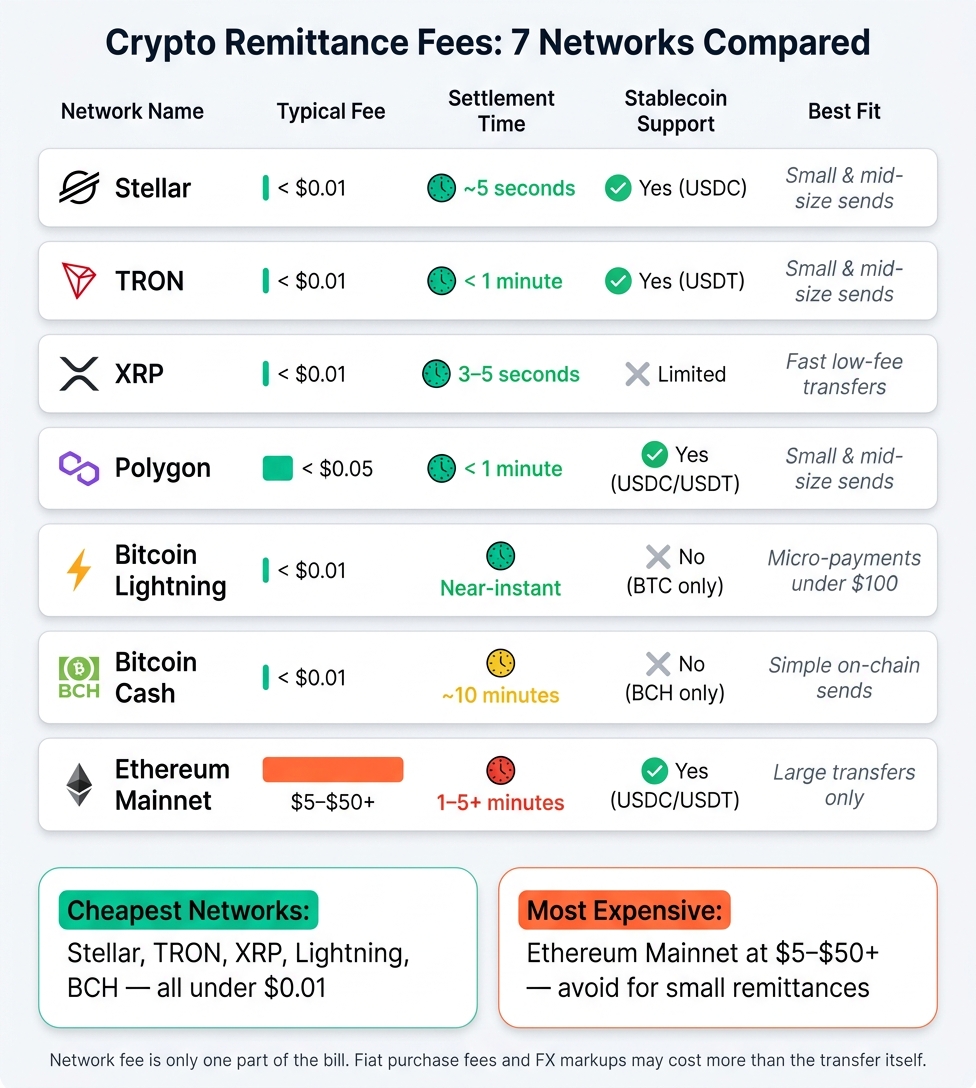
Crypto Remittance Fees: 7 Networks Compared at a Glance
| Network | Typical Fee | Settlement Time | Main Use |
|---|---|---|---|
| Stellar | < $0.01 | ~5 seconds | Small and mid-size stablecoin sends |
| TRON | < $0.01 in many cases | <1 minute | USDT remittances |
| XRP | < $0.01 | 3–5 seconds | Fast native-token transfers |
| Polygon | < $0.05 | <1 minute | Low-cost stablecoin sends |
| Bitcoin Lightning | < $0.01 | Near-instant | Small BTC payments |
| Bitcoin Cash | < $0.01 | ~10 minutes | Low-cost on-chain BCH sends |
| Ethereum mainnet | $5–$50+ | 1–5+ minutes | Large transfers only |
I’d keep one rule in mind: network fee is only one part of the bill. If you need to buy crypto first, fiat purchase fees, exchange spreads, and FX markups can cost more than the transfer itself.
sbb-itb-0796ce6
7 blockchain networks compared for cross-border remittance costs
The table below shows how seven networks stack up on fees, speed, and setup friction.
| Network | Typical Fee (USD) | Settlement Time | Stablecoin Support | Congestion Sensitivity | Best Fit |
|---|---|---|---|---|---|
| Stellar | <$0.01 | ~5 seconds | Yes (USDC) | Very Low | Small & mid-size |
| TRON | <$0.01 | <1 minute | Yes (USDT) | Low | Small & mid-size |
| XRP | <$0.01 | 3–5 seconds | Limited | Low | Fast low-fee transfers |
| Polygon | <$0.05 | <1 minute | Yes (USDC/USDT) | Low–Moderate | Small & mid-size |
| Bitcoin Lightning | <$0.01 | Near-instant | No (BTC) | Low | Micro-payments (<$100) |
| Bitcoin Cash | <$0.01 | ~10 minutes | No (BCH) | Low | Simple on-chain sends |
| Ethereum Mainnet | $5–$50+ | 1–5+ minutes | Yes (USDC/USDT) | Very High | Large transfers only |
The biggest gaps now aren't just about raw fees. They come down to wallet setup, stablecoin support, and how well each network holds up when traffic picks up.
XRP, Stellar, and TRON: low-cost payment transfer options
For small remittances, setup friction can matter just as much as the fee. A transfer that costs less than a penny still becomes a headache if the sender or receiver gets stuck during setup.
Stellar stands out for USDC. TRON is a common pick for USDT. XRP is best known for very fast native-token transfers. Each one can work well for small and mid-size payments, but there’s a detail many first-time users miss: Stellar and XRP often require a memo or destination tag for exchange deposits. Skip that step, and the funds can end up lost.
Polygon, Bitcoin Lightning, and Bitcoin Cash: cheap send options

These three can also keep costs low, but each has its own catch.
Polygon needs MATIC to pay gas fees. Bitcoin Lightning needs a Lightning-ready wallet, which adds one more setup step. Bitcoin Cash is simple and cheap to send on-chain, though it usually takes longer to confirm at around 10 minutes.
Ethereum mainnet and layer twos for stablecoin remittances
For larger transfers, the fee gap gets wide in a hurry.
Ethereum mainnet is the most expensive network in this comparison by a long shot. Fees often land in the $5–$50+ range and can jump much higher during busy periods. That makes it a poor choice for small remittances, even if the stablecoin support is strong.
Layer 2s cut those costs sharply. Networks like Arbitrum and Optimism can bring Ethereum-compatible stablecoin transfers down to about $0.10–$0.50, with settlement in under a minute. The trade-off is extra setup. Funds may need to be bridged from Ethereum mainnet to the L2 first, or sent from an exchange that already supports direct L2 withdrawals.
Which network costs least for small and mid-size transfers
The cheapest option depends on three things: the amount you’re sending, the asset you’re moving, and how the receiving wallet is set up.
Best network choices for transfers under $100
For small transfers, fixed fees and wallet setup usually matter more than percentage-based cost.
For amounts under $100, Stellar and Polygon are usually the best picks. Their fees often come in below $0.01. Bitcoin Lightning can also stay cheap, but wallet setup and routing fees can change from one send to the next.
TRON can come with a hidden first-send cost. Standard TRON transfers are cheap, but some new USDT wallets can trigger an account-initialization fee. Before you send, check the recipient address on TronScan. If the address has no USDT history, the transfer may cost more.
Best network choices for transfers from $100 to $1,000
As the amount goes up, tiny fee gaps matter less. Support and stability start to matter more.
In the $100 to $1,000 range, fixed fees take up a much smaller share of the transfer. That shifts the choice toward stablecoin support and exchange support. TRON’s typical fee of about $1.50 is only 0.15% of a $1,000 transfer, and broad support across major platforms makes it a solid default for exchange-to-exchange sends. Polygon and Ethereum Layer 2s are often cheaper, but there’s a catch: both the sending side and the receiving side need to support the same network.
That’s where the small print starts to matter. A network may look cheap on paper, then cost more because of tags, gas tokens, congestion, or timing. Next, the real cost comes down to those details.
Beginner trade-offs that affect the real cost of a remittance
Memos, tags, gas tokens, and wallet requirements explained
Raw fees are only part of the story. Wallet rules can add cost fast, or block a transfer outright.
For exchange deposits, XRP requires a destination tag and Stellar requires a memo. If you miss either one, the funds usually land in the exchange’s pooled wallet instead of your own account. Getting that sorted out can take 3 to 10 business days.
Ethereum and Polygon have another catch: you need the native gas token to move funds. So even if your wallet only holds USDC, you still need ETH or MATIC to pay the network fee. And on Ethereum, a failed transaction can still burn the fee you set aside.
TRON works a bit differently. Its resource model changes what you pay in practice: fees can stay tiny when resources are available, but the TRX cost goes up when they aren’t. XRP self-custody wallets come with one more cost to plan for: a 10 XRP base reserve. That amount stays locked unless you close the account.
Network congestion, timing, and fee predictability
If you send money on a schedule, fee predictability matters almost as much as the fee itself.
XRP and Stellar both offer near-instant finality, and their fees tend to stay steady in most conditions. That makes them easier to budget for recurring transfers. TRON is also fairly steady for standard sends.
Ethereum mainnet is the hardest one to predict. Gas fees can jump 3 to 5x during busy periods. A quick check of Etherscan’s Gas Tracker before sending can help you dodge the worst spikes.
Keeping fiat-to-crypto purchase costs separate from transfer fees
When you compare networks, keep transfer fees and fiat purchase costs in separate buckets.
The blockchain fee itself, what Stellar or TRON charges to move your crypto, is often under $0.01. But the purchase step can cost more than the transfer. That step may include:
- an exchange spread
- a conversion fee
- an FX markup
That’s why upfront pricing matters. Kryptonim is one option to know: it’s an EU-regulated platform that lets you buy crypto directly with fiat without creating an account. Picking a stablecoin like USDC or USDT also cuts out price-swing risk while the funds are in transit.
Compare the network fee on its own, then look at the fiat purchase cost separately.
Final comparison: matching the right network to your fee and speed needs
Once you factor in fees, speed, and setup trade-offs, the best network mostly comes down to transfer size. The cheapest option on paper isn't always the best one in practice. Settlement time, stablecoin support, and how much setup is involved all affect the end result.
When networks get busy, Ethereum fees climb the fastest. Stellar and TRON tend to stay more steady.
For transfers under $100, Bitcoin Lightning is a strong pick for BTC, while Stellar or TRON make sense for stablecoins. All three keep fees close to zero and usually settle in seconds. At that point, the deciding factor is often the recipient's exchange. If that exchange doesn't support the network you picked, you may run into extra steps or higher conversion costs.
For transfers between $100 and $1,000, Stellar or TRON usually make the most sense. Fees stay near zero, and stablecoins help limit price swings while the transfer is still pending.
When fees spike, Ethereum mainnet becomes a poor fit for small remittances. L2s such as Arbitrum and Optimism are cheaper, but they do add one more setup step.
Here’s the condensed view:
| Network | Best Fit | Typical Fee | Settlement Time |
|---|---|---|---|
| Bitcoin Lightning | Transfers under $100 (BTC) | Fraction of a cent | Seconds |
| Stellar / TRON | Small to mid-size ($100–$1,000) | <$0.01 | 3–30 seconds |
| Bitcoin Cash | Simple on-chain sends | <$0.01 | ~10 minutes |
| Ethereum L2s | Stablecoin transfers, larger amounts | $0.10–$0.50 | <1 minute |
Match the network to both the transfer size and the exchange the recipient uses. Pick the route well - especially on Stellar or TRON - and your total remittance cost can land under 1%.
FAQs
Which network is best for USDC or USDT remittances?
It comes down to what matters most to you: cost, speed, or compatibility.
- Lowest cost: Solana, Base, and Polygon
- Broad compatibility: TRON (TRC-20) for USDT
- Maximum security: Ethereum (ERC-20), though fees are often higher
One thing you should ALWAYS check: the recipient’s wallet must support the same network. If it doesn’t, your funds can be lost.
What extra costs can raise the total remittance fee?
Beyond the base network or gas fee, total remittance costs can climb because of a few other charges:
- conversion spreads or exchange-rate markups
- service markups or fixed platform fees
- extra charges tied to your payment method
That’s why it helps to look at the total cost, not just the network fee.
How do I know if the recipient supports my chosen network?
Make sure both wallets support the exact same blockchain network before you send anything. Check the recipient’s wallet address and confirm the network type, such as Ethereum, Solana, or Tron.
If the networks don’t match, your funds could be permanently lost. To cut the risk, double-check the network settings in both apps and consider sending a small test transaction first.