
Smart Contracts in Crypto Crowdfunding
How to verify crypto crowdfunding contracts: check pledges, approvals, refunds, admin powers, milestones, and wallet permissions.

I check who can move my money before I fund a crypto campaign - not just whether it uses a smart contract. Code can control pledges, payouts, and refunds, but it cannot make a creator deliver. Even a 100% funded campaign can fail to produce a product.
Before I pledge, I check:
- Funding rules: The token, network, goal, deadline, pledge limits, and who must finalize the campaign.
- Refunds and payouts: How I claim money back, how much remains in escrow, and who approves each milestone.
- Admin control: Who can pause claims, change rules, or upgrade the contract.
- Wallet safety: The official addresses, audit scope, spending permissions, and gas costs.
My rule: <u>check the deployed contract, not just the campaign page</u>. An approval is permission to spend, not proof of a pledge - and a refund in tokens may not return the same dollar value.
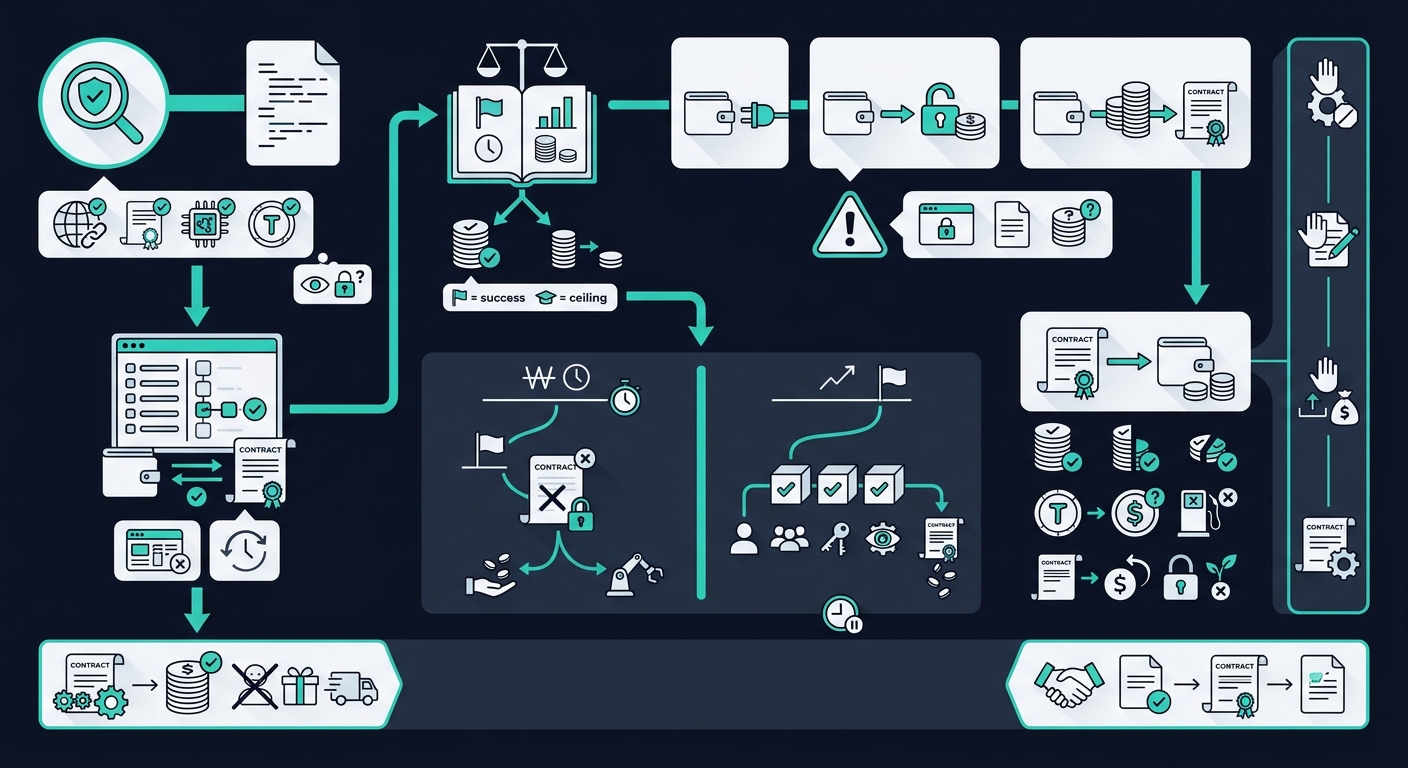
Crypto Crowdfunding: From Wallet Checks to Payouts and Refunds
How pledges, goals, and deadlines work
Connect your wallet and submit a pledge
Open the official campaign page, connect your wallet, and choose the required network and token. If the contract needs an allowance, approve only the amount you intend to pledge. Avoid unfamiliar or unlimited approvals, then submit the pledge transaction.
ERC-20 approval grants spending permission - it does not record a pledge. The pledge transaction lets the contract record your contribution and update your balance. Sending tokens directly may not create a contributor record, which could leave you ineligible for refunds or rewards.
After submitting, check that the contract recorded your pledge correctly. Verify the transaction hash, contract address, and pledge event or recorded balance. Don’t rely on the dashboard alone. If the transaction is pending or fails, check its status before trying again so you don’t pledge twice.
Check pledge limits and funding rules
The goal sets success; the hard cap sets the funding ceiling. The contract code - not the website - enforces pledge limits, deadlines, and settlement rules. Check whether the minimum applies to each pledge and whether the per-wallet cap counts earlier contributions.
Overfunding rules vary. A contract may reject a pledge that exceeds the limit, accept only the remaining capacity and return the excess, or allow uncapped overfunding under separate terms.
Cancellation rules differ, too. Some contracts let you cancel before the deadline; others restrict cancellation once the campaign reaches its goal. And hitting the goal may not release payouts early. After the deadline, the organizer or another permitted caller may still need to finalize the campaign.
Buy the right asset and set aside gas
Once you understand the pledge rules, buy the exact asset on the required network. Set aside enough native coin to pay gas for approval, pledging, and a possible refund claim.
U.S. readers should check regional availability, supported assets and networks, withdrawal options, and the total purchase price - including fees and spreads. Buying crypto does not validate the campaign or control its escrow or refunds.
Before confirming, check these details one last time:
- Pledge minimums, the per-wallet cap, and total contribution limits.
- Cancellation rights, who can finalize the campaign, and how excess funding is handled.
- The function, amount, and allowance requested in your wallet.
sbb-itb-0796ce6
How refunds and milestone payouts work
Check refund rules and claim funds
If a campaign fails, check your recorded contribution, the refund function, the claim deadline, and how much escrow remains for refunds. Confirm which token you’ll receive. Some refunds happen automatically, but many require a claim transaction. The contract should mark each refunded balance to block duplicate claims.
Check whether refunds are full, partial, or prorated, and whether earlier payouts reduce the amount available. Getting the original token back does not guarantee getting its original dollar value back.
| Campaign state | Creator access | Contributor action | Refund availability |
|---|---|---|---|
| Successful, milestone still pending | Limited by the approval rules | Follow the review or dispute process | Depends on the milestone terms |
| Failed below goal at deadline | Blocked under all-or-nothing rules | Use the documented refund function after failure is finalized | Subject to eligibility and available escrow |
Use the documented refund function at the verified contract address. Never send money or share your seed phrase to get a refund. Gas spent claiming a refund usually isn’t recovered.
If the campaign hasn’t failed, check whether a milestone can still release funds.
Check milestone approval and release rules
For each milestone, review the deliverable, payout amount, due date, required evidence, approver, review window, rejection rules, and dispute process.
Look closely at the payout calculation. Do percentages apply to the goal, total contributions, or remaining escrow? Are fees deducted before or after that calculation, and who pays the release gas? Also check whether missed deadlines trigger refunds or just delay payment.
Code can verify approvals, but it can’t judge product quality or whether evidence is truthful. That judgment rests with the designated reviewers.
Who can approve a payout depends on the release model:
| Model | Release authority | Transparency | Control risk | Dispute path |
|---|---|---|---|---|
| Creator-triggered | Creator or project admin | Evidence and releases may be public | Broad creator discretion | Often external |
| Backer-vote | Eligible contributors under defined voting rules | On-chain votes can be audited | Large holders or low participation can distort results | Check quorum, challenge, and appeal rules |
| Multisignature | A threshold of named signers | Signatures and releases are generally visible on-chain | Depends on signer independence | Check fallback rules if signers disagree |
| Reviewer/oracle | Designated reviewer or external data provider | Depends on published reports and records | Depends on reviewer or provider independence | Check appeal, replacement, or arbitration rules |
Those approvals only matter if the connected wallet and signing permissions match the contract.
Review admin powers and remaining funds
Identify who can pause claims, cancel the campaign, change milestones, replace approvers, alter fees, withdraw unallocated funds, or upgrade the contract. Check withdrawal caps, timelocks, and whether admin actions emit public events. An upgrade can change the contract’s logic without changing its address.
For late or rejected milestones, check whether the remaining escrow becomes refundable and how claims are divided. Refund rights over unused funds do not cover money already paid out.
Before sending funds, review the refund, milestone, dispute, and cancellation rules. Identify every admin and approver, check whether the contract can be upgraded, and compare the remaining escrow with possible claims.
These details provide the basis for the wallet-link and permission checks that follow.
Check wallet links and permissions
Before you connect or approve anything, check that the site, docs, wallet, contract, token, and explorer all point to the same campaign. Confirm the chain ID and compare addresses with published records - not wallet prompts or DMs.
These checks help you trace where your pledge goes and which contract handles refunds or milestone payouts. Use the explorer to review balances, transfers, code, and admin activity. Then check whether the wallet prompt points to the real contract or a fake.
Verify addresses, contract code, and audits
Open the official domain from a trusted bookmark. Compare contract addresses across the project’s documentation, repository, and audit report. Check the token’s symbol, address, and decimals. A familiar name alone proves nothing. On the explorer, check that the verified source code matches the deployed bytecode. If the contract uses a proxy, inspect its implementation address and upgrade authority, too.
Review the audit date, auditor, scope, and code version. Check for unresolved critical or high-severity findings and any changes made after the audit. Verified code shows transparency, not safety. An older audit may not cover the current deployment. Audits, public listings, and polished websites do not endorse a campaign.
Review approvals and signing requests
Connecting your wallet does not spend funds. It normally shares your public address and lets the site request actions. A native-coin pledge sends funds immediately. A token approval lets a spender move tokens later, and a separate pledge transaction may use that allowance. Some signature requests also authorize later spending. A wrong approval can put your funds at risk before the campaign logic runs.
Before signing, check the domain, network, contract, token, function, recipient or spender, amount, allowance, fee, and preview. Reject requests you cannot read or explain, unexpected recipients, and unlimited allowances. Choose a limited allowance and use a dedicated wallet containing only campaign funds plus gas. If anything differs from the documented steps, stop.
After signing, look up the transaction hash in the explorer. Check its status, function, recipient, amount, fee, and remaining allowance. Compare the result with the campaign dashboard: a successful transaction does not prove that your intended pledge occurred. Revoke unused permissions, but know the limits: revocation cannot recover transferred funds, and wallet providers cannot reverse confirmed payments.
Conclusion: check the rules before funding
Smart contracts control which pledges are accepted and how funds can be accessed. They don’t tell you whether a creator is honest or can deliver. Refunds depend on the stated conditions and enough money remaining in escrow. Milestone payments may still need human approval. Automation does not remove campaign risk.
Decide whether to fund the campaign
Once you’ve checked pledges, refunds, milestones, and permissions, decide whether to fund. Confirm that the campaign terms match the deployed contract. If the code and terms conflict, walk away. Save the transaction hash and contract details.
Before approving, check the signing request against those terms. A small test pledge can confirm where the money goes - not whether it’s safe. Test only if the contract supports it and you can accept losing that money.
Walk away if any rule is unclear or inconsistent. Fund only when the contract, recovery path, and approval rules match the campaign terms.
FAQs
What if no one finalizes the campaign?
If a campaign isn’t finalized or falls short of its goals, its smart contract may issue refunds automatically. Many contracts have built-in rules that return contributions when a project misses preset goals - no human action or manual processing needed. These rules help protect backers’ funds when a campaign doesn’t succeed.
Can I claim a refund if I lose my wallet?
No. In blockchain crowdfunding, losing access to your private keys or recovery phrase means losing control of your funds. Blockchain transactions can’t be undone, and no central authority can reverse a transfer or recover lost assets.
Keep your recovery information in a secure offline location, and consider wallets that offer social recovery options.
What happens if milestone approvers stop responding?
If milestone approvers stop responding, the next stage of funds stays locked until the smart contract’s required approvals or conditions are met. If the project fails to reach its goals, refunds can happen automatically - but only if the contract’s predefined failure conditions are met.
Before sending funds, check the contract’s milestone approval and refund rules.