
How to Buy Crypto in Poland with BLIK
Step-by-step guide to buying BTC, ETH or USDT in Poland via BLIK: fees, limits, KYC, network checks and safety tips.
If I want to buy crypto in Poland with BLIK, the process is simple: enter a PLN amount, add a wallet address, type a 6-digit BLIK code, approve the payment in my bank app, and wait for delivery.
Here’s the short version:
- I can buy BTC, ETH, or USDT with PLN
- BLIK codes expire in about 2 minutes, so timing matters
- Kryptonim charges a 2% fee
- The final crypto amount can change a bit because the rate is set when payment is processed
- I need to check my wallet address, network, and bank limits before I pay
- KYC starts from the first purchase, so I should have my ID ready
- In Poland, crypto gains are taxed at 19%, and they are reported on PIT-38 by April 30 of the next year
That means the main job is not the payment itself. The main job is avoiding simple mistakes: using an expired BLIK code, picking the wrong USDT network, or hitting a bank limit.
A few things I’d check before I start:
- Bank app ready: BLIK turned on, enough PLN balance
- Wallet ready: correct address and correct blockchain network
- Verification ready: ID, selfie, and maybe proof of address
- Safety check: merchant name matches, payment amount matches, site is secure
For example, if I buy PLN 1,000.00, a 2% fee means PLN 20.00 goes to fees and PLN 980.00 goes toward crypto. If BTC were PLN 250,000.00, that would be about 0.003920 BTC before any rate shift at processing.
The bottom line: BLIK is a fast way to buy crypto in Poland, but I need to move fast, verify the details, and keep tax records. The rest of this guide walks through the checkout flow, limits, delays, and the mistakes I’d avoid.
Why Use Kryptonim for BLIK Purchases in Poland
If your bank app is set up and your wallet address is ready, buying crypto with BLIK on Kryptonim is pretty simple. Kryptonim is an EU-regulated platform that lets you buy crypto in Poland using PLN, and the checkout moves from entering your amount to payment approval in just a few steps.
Supported Coins, PLN Payments, and the Checkout Flow
Kryptonim supports Bitcoin (BTC), Ethereum (ETH), and Tether (USDT).
Here’s how the checkout works. You enter the PLN amount you want to spend, then review the fee and the estimated amount of crypto you’ll get. After that, you generate your 6-digit BLIK code in your bank app and enter it at checkout. Then you approve the payment in your bank app, and the crypto is sent to the wallet address you provided.
Fees, Exchange Rates, and How to Read the Final Amount
Kryptonim charges a 2% fee per transaction for EU users. You’ll see that fee before you confirm the purchase, which makes the cost clear upfront.
One detail matters here: the final crypto amount is set when the payment is processed, not when you first enter the order. So the estimate you see at the start can change slightly based on the live market rate at that moment. The examples below show how the 2% fee affects the PLN amount that goes toward crypto.
Fee Examples for BLIK Purchases on Kryptonim
The table below shows how the 2% fee works for three common purchase amounts, using a hypothetical BTC price of 250,000 PLN for illustration.
| Purchase Amount (PLN) | Kryptonim Fee (2%) | Net for Crypto (PLN) | Approx. BTC Received* |
|---|---|---|---|
| 100.00 PLN | 2.00 PLN | 98.00 PLN | ~0.000392 BTC |
| 500.00 PLN | 10.00 PLN | 490.00 PLN | ~0.001960 BTC |
| 1,000.00 PLN | 20.00 PLN | 980.00 PLN | ~0.003920 BTC |
*All values are hypothetical examples based on a BTC price of 250,000 PLN. Actual output depends on the live market rate at the time of processing and is not guaranteed.
Next, it helps to look at the limits and verification rules that can affect larger or repeated BLIK purchases.
sbb-itb-0796ce6
How to Buy Crypto with BLIK on Kryptonim: Step by Step
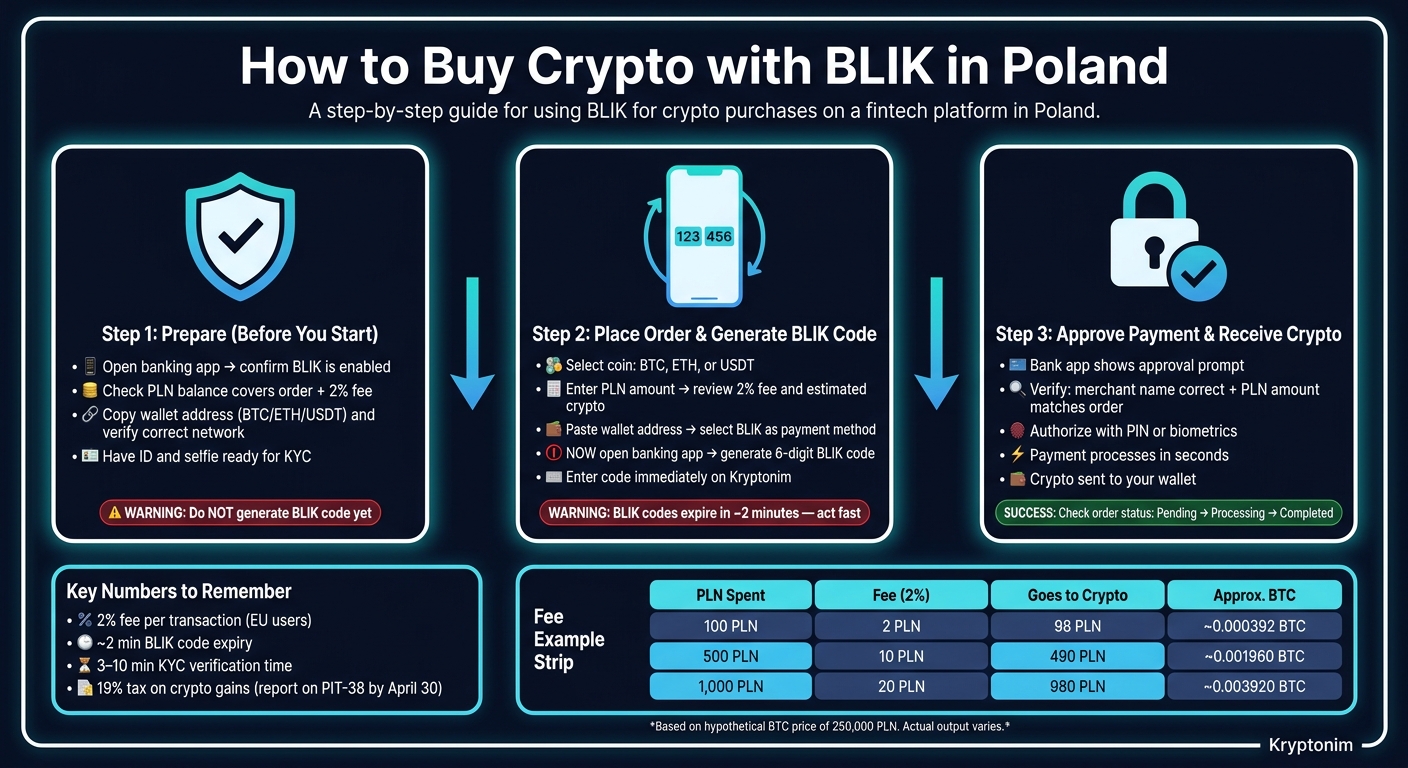
How to Buy Crypto with BLIK in Poland: Step-by-Step Guide
Step 1: Prepare Your Bank App and Wallet Details
Once you've picked your coin, amount, and fee, checkout comes down to three simple steps.
Before you head to Kryptonim, get two things ready: your bank app and your wallet address. Open your banking app and make sure BLIK is turned on. Then check that your PLN balance covers both the order and the fee.
If you're sending crypto to your own wallet, copy the wallet address with care and match the network exactly. That means Bitcoin for BTC, Ethereum for ETH, and the right network for USDT. One small mismatch can cause a headache. Also, don't generate your BLIK code yet. Wait until Kryptonim asks for it.
Step 2: Place the Order and Generate Your 6-Digit BLIK Code
On Kryptonim, choose the coin you want - BTC, ETH, or USDT - and enter the amount in PLN. Take a second to review the fee and final amount before you move on.
Then paste your wallet address into the field provided and choose BLIK as your payment method. Only now should you open your banking app and generate the 6-digit BLIK code.
Timing matters here. BLIK codes expire fast, so generate the code only when Kryptonim prompts you and enter it right away. If the code expires before you finish, just create a new one and try again.
Step 3: Approve the Payment and Receive Your Crypto
After you enter the BLIK code on Kryptonim, your banking app will ask you to approve the payment. Before you tap confirm, check the merchant name and make sure the PLN amount matches your order. Then authorize the payment with your PIN or biometrics.
Once you approve it, the payment usually goes through within seconds. Kryptonim then converts your PLN and sends the crypto to your wallet.
If the payment gets blocked or takes longer than expected, the next section covers the usual limits and common mistakes.
Limits, Verification, and Common Mistakes
Before you confirm payment, check your verification status, limits, and wallet details. Those three things are behind most failed BLIK orders.
KYC and Compliance for Larger or Repeated Purchases
Full KYC applies from your first purchase under EU and Polish rules. In practice, verification can show up before payment approval or after a few purchases.
You’ll need a government-issued ID and a selfie for the identity check. If you want higher limits or your activity becomes more frequent, Kryptonim may also ask for proof of address, such as a utility bill or bank statement from the last three months.
Automated verification often takes about 3 to 10 minutes. It’s smart to have your documents ready before checkout and take your selfie in a well-lit room. A dim photo or blurry ID can slow things down.
Bank and Platform Limits That Can Block a Payment
Two separate limits can stop a BLIK purchase: Kryptonim’s limit and your bank’s limit. You need to check both before you pay.
If you’re planning a larger buy, open your Polish banking app and make sure your BLIK and internet transaction limits are set above the amount you want to spend. Kryptonim’s limit is usually shown on the checkout screen, often behind an "i" or "Limit" icon. As your purchase history grows, verification-based caps can apply too.
| Limit Type | Controlled By | Where to Check | What You'll See If You Hit It |
|---|---|---|---|
| Per-transaction cap | Platform | Checkout "i" or "Limit" icon | "Amount exceeds maximum" error |
| Bank-set BLIK or online payment cap | Your bank | Banking app → Settings → Limits | BLIK code accepted, but bank rejects authorization |
| KYC-based cap | Platform / EU law | Profile → Verification level | Request for additional ID or proof of address |
| Code expiry | BLIK system | Timer next to code in your banking app | "Invalid or expired BLIK code" error |
If the order still fails, the cause is usually one of four things: the wallet address, the network, an expired code, or a price move during checkout.
Wrong Address, Wrong Network, Expired Code, and Price Changes
A wrong wallet address is one of the costliest mistakes you can make. Crypto sent to the wrong address usually cannot be recovered. That’s why copy-paste or QR scanning is the safe move. Typing the address by hand is asking for trouble. If you’re using a new wallet, send a small test amount first.
The wrong network is another common issue, especially with USDT, since it exists on more than one blockchain. Send USDT on the wrong network, and you can lose the funds for good. Before you confirm anything, check that the network shown on Kryptonim matches the one your receiving wallet supports.
Rates update every few seconds, so the final amount can shift if you wait too long. BLIK codes also expire fast. Put those two together, and even a short delay can break the checkout flow. Enter the code right away and avoid pausing mid-payment.
How to Track Your Transaction and Finish Safely
Where to Check Payment and Order Status
Once your payment is approved, do a quick double-check to make sure everything went through the way it should.
Start with your bank history. After that, open your Kryptonim order and review the status. Here’s what each status means:
- Pending means the payment is still waiting for confirmation.
- Processing means the crypto is being sent.
- Completed means the delivery is done.
When the order shows Completed, check your wallet balance directly. If you got a TXID, look it up in the correct block explorer.
What to Do If the Payment Went Through but Crypto Is Delayed
If your bank history shows the debit but the crypto hasn’t arrived yet, don’t panic. In many cases, it’s just a short delay while the payment and transfer are being confirmed.
If the status doesn’t change right away, wait a bit before doing anything. But if the delay lasts several hours, check the order status on Kryptonim and review any email or in-platform notification you may have received.
If the payment was deducted but the order failed, the amount is usually refunded automatically within a few hours. If the refund still doesn’t show up after a few hours, contact Kryptonim support and include:
- your bank payment confirmation
- your order ID
Use the checklist below before your next purchase.
Key Points to Check Before Your Next BLIK Crypto Purchase
Before you confirm the payment, check three things:
- Make sure the merchant name in your bank app is correct.
- Match the wallet address and network with the destination wallet.
- Confirm that your bank app’s transaction limit is high enough for the purchase amount.
FAQs
Can I use any Polish bank app with BLIK?
Yes - BLIK works with the mobile apps of major Polish banks, including Alior Bank, Bank Millennium, Santander Bank Polska, ING Bank Śląski, mBank, PKO Bank Polski, and others. It also works with the Revolut mobile app.
To pay with BLIK, you need your bank’s mobile app installed on your phone, and that app must support BLIK.
How long does a BLIK crypto purchase usually take?
A BLIK crypto purchase usually goes through in seconds to a few minutes.
Once you enter your six-digit code and approve the payment in your mobile banking app, the bank will often process it right away.
Most platforms then credit the crypto to your wallet almost immediately, though the exact timing can vary a bit from one platform to another.
What happens if I send USDT on the wrong network?
When you send USDT, make sure the blockchain network matches your receiving wallet.
If you pick the wrong network, or one the wallet doesn’t support, your funds can be permanently lost.
Before you confirm the transaction, double-check that the network you selected matches your destination wallet’s requirements.